E

Emilio Loewenstein

3
Workflows

Workflows by Emilio Loewenstein
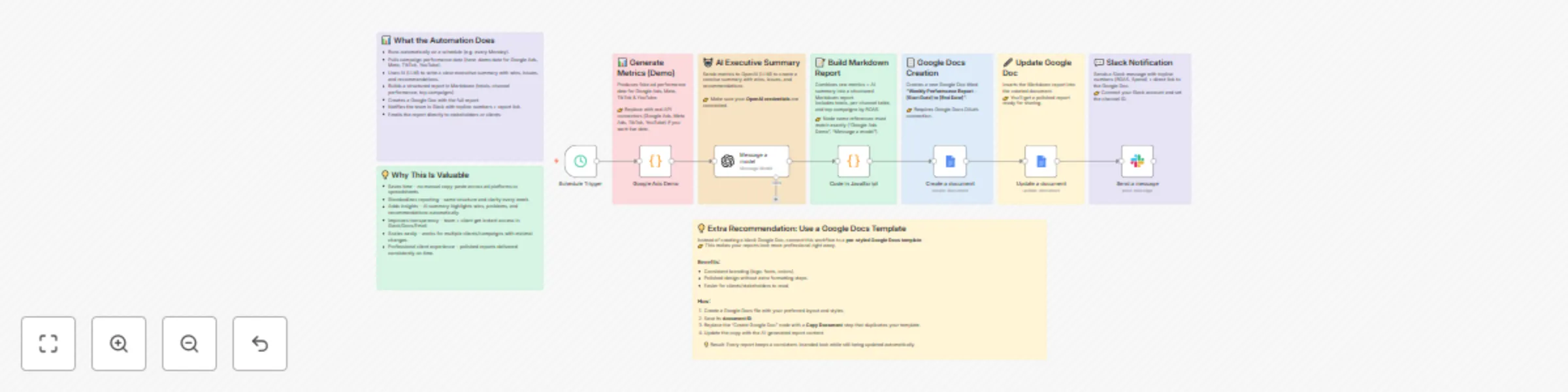
Workflow preview: Generate weekly marketing performance reports with GPT-4o & Google Docs to Slack
Free advanced

Generate weekly marketing performance reports with GPT-4o & Google Docs to Slack

## Description Save hours of manual reporting with this **end-to-end automation**. This workflow pulls campaign performance data (demo or live), generates a **clear AI-powered executive summary**, and compiles everything into a polished weekly report. The report is formatted in Markdown, automatically stored in **Google Docs**, and instantly shared with your team via **Slack** — no spreadsheets, no copy-paste, no delays. ### What it does - ⏰ Runs on a schedule (e.g. every Monday morning) - 📊 Collects performance metrics (Google Ads, Meta, TikTok, YouTube – demo data included) - 🤖 Uses AI to summarize wins, issues, and recommendations - 📝 Builds a structured Markdown report (totals, channel performance, top campaigns) - 📄 Creates and updates a **Google Doc** with the report - 💬 Notifies your team in Slack with topline numbers + direct report link - 📧 Optionally email the report to stakeholders or clients ### Why it’s valuable - **Saves time** – no manual data aggregation - **Standardizes reporting** – same format and quality every week - **Adds insights** – AI highlights what matters most - **Improves transparency** – instant access via Docs, Slack, or Email - **Scales easily** – adapt to multiple clients or campaigns - **Professional delivery** – branded, polished reports on autopilot 💡 Extra recommendation: Connect to a **Google Docs template** to give your reports a professional, branded look.

E
Emilio Loewenstein
Market Research
15 Oct 2025
144
0

Workflow preview: AI-powered Gmail customer support with OpenRouter & Pinecone knowledge base
Free advanced

AI-powered Gmail customer support with OpenRouter & Pinecone knowledge base

This workflow automates **customer email support** by combining Gmail, AI classification, and a knowledge base to provide instant, accurate, and friendly responses. It’s designed for businesses that want to improve customer satisfaction while reducing manual workload. --- ## 🚀 How it Works 1. **Gmail Trigger** The workflow listens for new incoming Gmail messages. 2. **Text Classification** Each email is classified using AI as either *Customer Support* or *Other*. - If it’s *Other*, the workflow stops. - If it’s *Customer Support*, the email continues to the AI agent. 3. **AI Agent with Knowledge Base** The AI agent: - Reads the customer’s message. - Searches the **Pinecone Knowledge Base** for FAQs and policies. - Generates a helpful, polite, and detailed reply using an **OpenRouter model**. - Signs off as *Mrs. Helpful from Tech Haven Solutions*. 4. **Reply to Gmail** The drafted email is automatically sent back to the customer. --- ## 💡 Value - ✅ **Save Time** – No more manual triaging and drafting of replies. - ✅ **Consistency** – Every answer is based on your own FAQ/policies. - ✅ **Customer Satisfaction** – Fast, friendly, and accurate responses 24/7. - ✅ **Scalable** – Handle higher email volume without scaling headcount. --- ## 🔑 Credentials Needed To use this workflow, connect the following accounts: - **Gmail OAuth2** → for receiving and sending emails. - **OpenRouter API** → for text classification and AI-generated replies. - **OpenAI API** → for embeddings (to connect FAQs with AI). - **Pinecone API** → for storing and retrieving knowledge base content. --- ## 🛠 Example Use Case A customer writes: > *“Hi, I placed an order last week but haven’t received a shipping confirmation yet. Can you check the status?”* The workflow will: 1. Detect it’s a support-related email. 2. Retrieve order policy information from the knowledge base. 3. Generate a friendly response explaining order tracking steps. 4. Automatically reply to the customer in Gmail. --- ## ⚡️ Setup Instructions 1. Import this workflow into your n8n instance. 2. Connect your Gmail, OpenRouter, OpenAI, and Pinecone credentials. 3. Populate your Pinecone knowledge base with FAQs and policies. 4. Activate the workflow. From now on, all support-related emails will be automatically answered by your **AI-powered support agent**. ---

E
Emilio Loewenstein
Support Chatbot
9 Oct 2025
148
0

Workflow preview: Automate sales call grading with Fireflies.ai, OpenAI, and Google Sheets
Free intermediate

Automate sales call grading with Fireflies.ai, OpenAI, and Google Sheets

Turn your **sales and onboarding calls into actionable insights — automatically!** This workflow connects **Fireflies.ai** with **OpenAI** to analyze and grade your call transcripts. The results, along with your lead’s details, are logged directly into a **Google Sheet** for easy tracking. Plus, you’ll get an instant **Slack or Gmail notification** with the evaluation so you can take quick action. --- ## 🚀 What It Does - **Triggers on new Fireflies.ai transcripts** - **Uses AI to evaluate and grade your calls** - **Logs lead + scoring data into Google Sheets** - **Sends instant updates via Slack or Gmail** --- ## 💡 Why It’s Valuable - Save hours of **manual call reviews** - Keep a **consistent, unbiased scoring system** - Centralize data for **reporting and coaching** - Act faster with **real-time notifications** Perfect for **sales, onboarding, or customer success teams** who want to improve call quality at scale while saving time. --- ## 🛠️ Setup Instructions 1. **Connect Fireflies.ai** – Enable transcript export from your Fireflies.ai account. 2. **Integrate with OpenAI** – Use the provided API key to analyze and score transcripts automatically. 3. **Configure Google Sheets** – Create a sheet with columns for: - Lead Name - Company - Call Date - Transcript Link - AI Score - Notes/Insights 4. **Enable Notifications** – Connect Slack or Gmail to receive instant alerts with evaluation details. 5. **Test & Launch** – Run a sample call to ensure transcripts flow correctly into the sheet and notifications are triggered. --- ## 🔄 Detailed Workflow 1. A new call transcript is generated in **Fireflies.ai**. 2. The transcript is sent to **OpenAI**, where the call is evaluated and scored based on quality, engagement, and outcomes. 3. The **results + lead data** are logged automatically into **Google Sheets** for centralized tracking. 4. A **Slack or Gmail notification** instantly alerts your team with the score and key insights, so you can take immediate action. --- ## 📊 Google Sheets Your Google Sheet should include the following columns: - **Lead Name** - **Email/Contact** - **Company Name** - **Call Date & Time** - **Transcript URL** - **AI Evaluation Score** - **Summary/Next Steps** This structure ensures clarity, easy reporting, and consistent data across all calls. --- ## ⚠️ Community Node Disclaimer This workflow is created with **community nodes** and integrations. Please review security and API key management best practices before deploying in production. --- ## 🖼️ Workflow Template ![Workflow Template Example](https://dummyimage.com/800x400/cccccc/000000&text=Workflow+Template+Preview) ---

E
Emilio Loewenstein
CRM
9 Oct 2025
82
0