D

David P

1
Workflow

Workflows by David P

Workflow preview: Curate and post AI news to X, Bluesky, Threads and more with GPT-5 mini and Cue
Free advanced

Curate and post AI news to X, Bluesky, Threads and more with GPT-5 mini and Cue

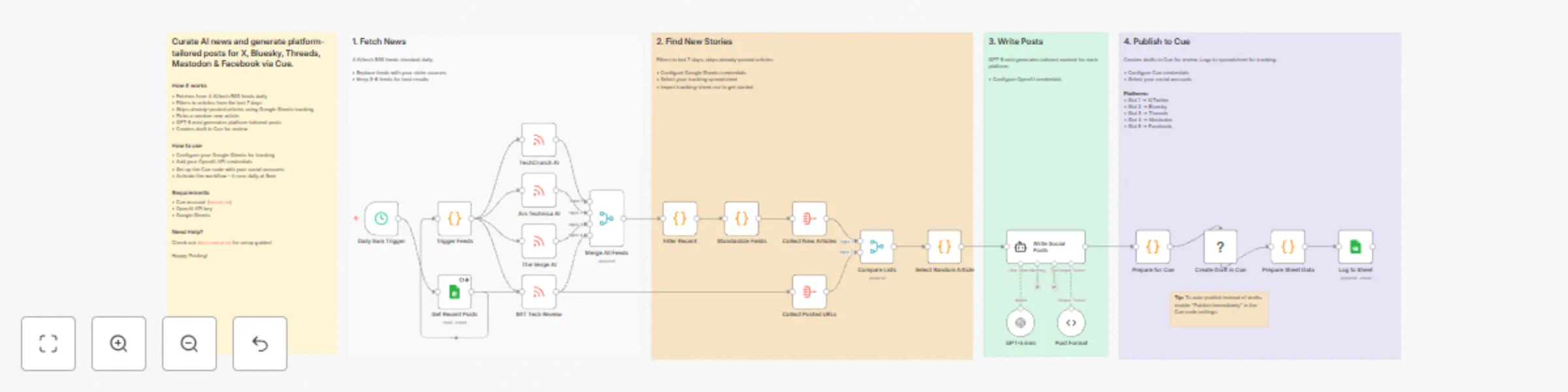
# Curate & post AI news to X, Bluesky, Threads & more via GPT-5 mini & Cue This n8n template automatically curates AI news from RSS feeds and generates platform-tailored social media posts using GPT-5 mini. Posts are saved as drafts in Cue for review before publishing to X, Bluesky, Threads, Mastodon, and Facebook. Use cases include: * Daily automated AI/tech news curation * Multi-platform social media content creation * Building thought leadership with consistent posting * Staying on top of industry news without manual effort ## Who is this for? This workflow is ideal for: * Tech content creators who want to share AI news across multiple platforms * Social media managers handling multiple accounts * Anyone building an audience around AI/tech topics * Teams who want consistent daily content without manual curation ## What problem does this workflow solve? Manually curating news, writing platform-specific posts, and publishing across 5 different social networks is time-consuming. This workflow automates the entire process: * **Curation** - Pulls from 4 trusted AI/tech RSS feeds daily * **Deduplication** - Tracks posted articles in Google Sheets so you never share the same story twice * **Content creation** - GPT-5 mini writes posts tailored to each platform's style and character limits * **Review workflow** - Creates drafts in Cue so you can review before publishing ## How it works 1. **Schedule Trigger** - Runs daily at 9am (configurable) 2. **RSS Feeds** - Fetches articles from TechCrunch AI, Ars Technica AI, The Verge AI, and MIT Tech Review 3. **Filter & Merge** - Combines all feeds and filters to articles from the last 7 days 4. **Deduplication** - Compares against Google Sheets to find unposted articles 5. **Random Selection** - Picks one random article from available stories 6. **AI Generation** - GPT-5 mini generates 5 platform-specific posts with appropriate tone and length 7. **Save to Cue** - Creates a draft post with all 5 platform variations 8. **Log to Sheet** - Records the article URL to prevent future duplicates ## Setup ### Requirements * [Cue account](https://oncue.so) with connected social accounts * OpenAI API key * Google account for Sheets ### Step 1: Install the Cue community node 1. Go to **Settings** → **Community Nodes** 2. Click **Install** 3. Enter `@cuehq/n8n-nodes-cue` ### Step 2: Create tracking spreadsheet 1. Create a new Google Sheet named "AI News Tracker" 2. Add these column headers in row 1: * `article_url` * `title` * `source` * `processed_at` ### Step 3: Configure credentials 1. **Google Sheets** - Add OAuth2 credentials and connect to the "Get Recent Posts" node 2. **OpenAI** - Add your API key and connect to the "GPT-5 mini" node 3. **Cue** - Add your API key from [Cue Settings](https://app.oncue.so/settings/api) ### Step 4: Configure the Cue node 1. Open the **Create Draft in Cue** node 2. Select your **Profile** 3. For each platform slot, select your social account: * Slot 1 → X/Twitter * Slot 2 → Bluesky * Slot 3 → Threads * Slot 4 → Mastodon * Slot 5 → Facebook Don't have all 5 platforms? Simply delete the unused slots. ### Step 5: Publish Save and click **Publish** to activate the workflow. ## Customizing this workflow ### Change the schedule Edit the **Daily 9am Trigger** node to run at a different time or frequency. ### Use different RSS feeds Replace the feed URLs with sources relevant to your niche. The workflow handles any standard RSS feed. Keep 3-6 feeds for best results. ### Auto-publish instead of drafts To publish immediately instead of creating drafts, enable **Publish Immediately** in the Cue node settings. ### Adjust the AI tone Modify the system prompt in the **Write Social Posts** node to match your brand voice or adjust platform-specific guidelines. ## Good to know * **Cost** - Each run uses one OpenAI API call. With GPT-5 mini, this costs approximately $0.01-0.02 per execution. * **Draft review** - Posts are created as drafts in Cue, giving you a chance to review and edit before publishing. * **Deduplication** - The Google Sheet tracks all posted URLs, so the same article is never shared twice. ## About Cue [Cue](https://oncue.so) is a social media scheduling platform that lets you manage and publish content across X, Bluesky, Threads, Mastodon, Facebook, LinkedIn, TikTok, and Instagram from a single dashboard. Key features: * **Multi-platform publishing** - Schedule once, publish everywhere * **Platform-specific content** - Tailor each post for different audiences * **Draft workflow** - Review and edit before publishing * **API & integrations** - Connect with n8n, Zapier, Make, and custom apps [Get started free](https://oncue.so) · [Documentation](https://docs.oncue.so) · [n8n Community Node](https://www.npmjs.com/package/@cuehq/n8n-nodes-cue)

D
David P
Social Media
11 Jan 2026
25
0