D

Dominic Spatz

2
Workflows

Workflows by Dominic Spatz

Workflow preview: Automate UniFi controller updates via SSH with Telegram notifications
Free intermediate

Automate UniFi controller updates via SSH with Telegram notifications

## Overview Automate UniFi Controller updates on self-hosted instances. This workflow checks the official UniFi Debian repo for a **fresh release in the last 24 hours** and, if found, upgrades the `unifi` package via SSH. It can also summarize changes and ping you on Telegram. Sticky notes are included to guide setup. ## How it works - **Schedule** runs daily (default **13:13**). - **HTTP Request** fetches `InRelease` and parses `Codename` + `Date`. - **IF gate** continues only if the repo changed within 24h. - **SSH** runs: ```bash apt-get --allow-releaseinfo-change update apt-get upgrade -y unifi ``` - **(Optional) LLM** creates a short summary → **Telegram** sends it. ## Setup - Bind credentials: **SSH** (required), **OpenAI** (optional), **Telegram** (optional). - Set env var **`TELEGRAM_CHAT_ID`** for notifications. - Adjust the **Schedule Trigger** to your maintenance window. - Import inactive, test once, then **activate**. ## Customize - Change the 24h freshness window in the Code node. - Swap Telegram for Slack/Email if preferred. - Add pre/post steps (backups, restarts) around the upgrade. ## Safety Test on a non-production controller first. No hardcoded secrets—uses n8n credentials and environment variables. If you want approval before upgrades, stop after the IF gate and notify only.

D
Dominic Spatz
DevOps
15 Sep 2025
362
0
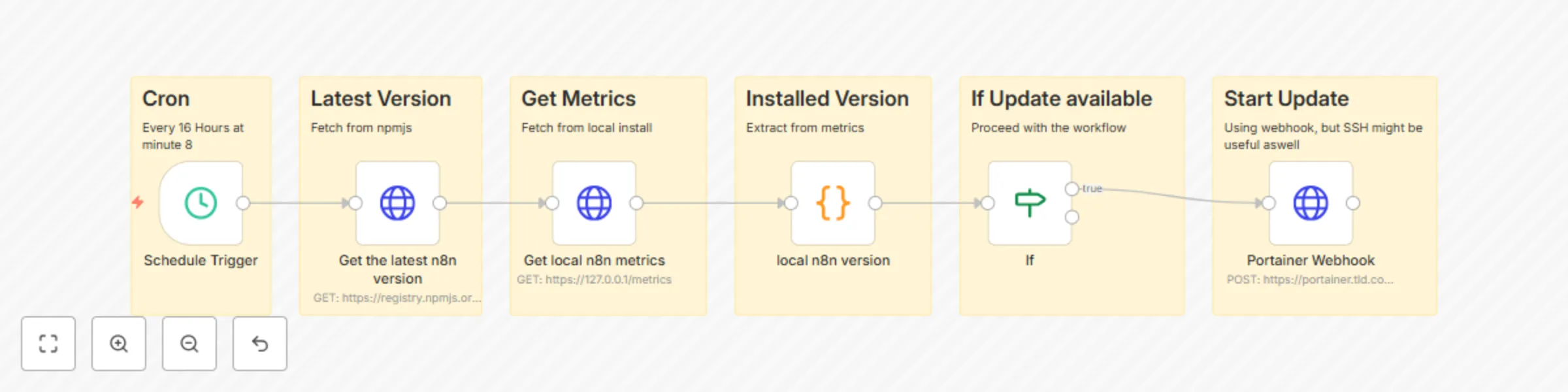
Workflow preview: Automate n8n updates with version checking and Portainer webhook
Free intermediate

Automate n8n updates with version checking and Portainer webhook

🔄 Purpose of the Workflow: The Update-N8N workflow is designed to automatically trigger a (Portainer) webhook to update an N8N container, but only if a new version of N8N is available. ⚙️ Detailed Workflow Steps: 🕒 Scheduled Trigger The workflow runs every 16 hours at minute 8 using a schedule trigger node. 🌐 Fetch Latest N8N Version It sends an HTTP GET request to https://registry.npmjs.org/n8n/latest to retrieve the latest published N8N version from the npm registry. 📈 Get Currently Running Local Version Another HTTP GET request is sent to https://127.0.0.1/metrics (likely the Prometheus metrics endpoint of the local N8N instance) to extract the currently installed N8N version. 🧠 Version Comparison The workflow compares the local version (parsed from metrics) with the latest available version. 📬 Trigger Portainer Webhook If the versions do not match (i.e., an update is available), a POST request is sent to a webhook URL, which might be a Portainer webhook that redeploys or updates the N8N container/stack. ✅ Key Benefits: No manual checks or updates needed. Triggers only when a new version is available. Integrates seamlessly with Portainer via webhook. Secure configuration, e.g., disallowing unauthorized TLS certs for external requests.

D
Dominic Spatz
DevOps
6 Aug 2025
266
0