Damian Karzon
Workflows by Damian Karzon
Weekly dinner meal plan using recipes from Mealie
This workflow randomly select recipes from a Mealie instance (can use a specific category) and then creates a meal plan in Mealie with those recipes. ## How it works: - Workflow has a scheduled trigger (set to run weekly on a Friday) - `Config` node sets a few properties to configure the workflow - A call to the Mealie API to get the list of recipes - The code node holds most of the logic, this will loop through the number of recipes defined in the config node and randomly select a recipe from the list (making sure not to double up any recipes) - Once all the recipes are selected it will call the Mealie API to set up the meal plan on the days ## Setup - Add your Mealie API token as a credential and set it on the Http Request nodes - Set the relevant schedule trigger to run when you like - Update the `Config` node with the config you want - numberOfRecipes - Number of recipes to populate for the meal plan - offsetPlanDays - Number of days in the future to start the plan (0 will start it today, 1 tomorrow, etc.) - mealieCategoryId - A category id of the category you want to pull in recipes from (default to select from all recipes) - mealieBaseUrl - The base url of your Mealie instance
Send Slack notifications when a new release is published for public GitHub repos
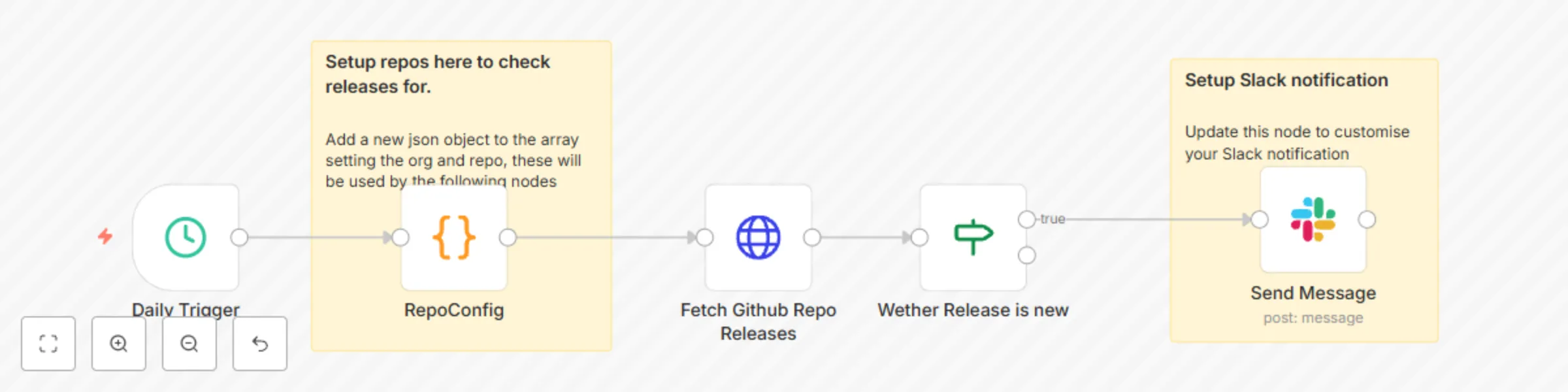
This workflow checks a configured list of Github repositories daily to see if a new release has been published. ### How it works: - Workflow has a daily trigger - `RepoConfig` node is a JSON array that defines a list of repositories to check releases for - For each of the configured repos it fetches the latest release - If the release was published within the last 24 hours it is output - The release is sent as a Slack message showing the repo name, release name and link ### Setup - Update the JSON in the RepoConfig node to the Github repos you wish to get notifications for - Setup your Slack connection (or replace with your choice of notification)