The Higher Pitch
Workflows by The Higher Pitch
Auto-Generate & Approve Social Media Posts from RSS Feeds with OpenAI & Telegram
Overview This workflow automates the process of converting RSS feed articles into ready-to-publish social media posts using OpenAI, NocoDB, and Telegram. It's ideal for content teams, marketing managers, or news portals seeking to automate content curation while maintaining control through a human approval system. Features RSS Feed Monitoring Polls a specified RSS feed every 20 minutes. Detects new articles automatically. AI-Powered Content Processing Summarizes the full article using OpenAI's Assistant API. Creates an image prompt based on the article summary. Generates a platform-specific post for Facebook and LinkedIn using AI. Image Generation Leverages OpenAI's image model to generate a relevant image from the prompt. Retrieves and stores the featured image from the original article (via custom code node). Post Management with NocoDB Stores all content in NocoDB including: Article URL AI-generated summary Image prompt Post content per platform Generated image URL Post status (Pending, Approved, Declined) Human Approval via Telegram Sends post preview to a Telegram group or channel with inline buttons: ✅ Approve ❌ Decline On approval: Posts to Facebook, LinkedIn, and optionally Twitter. On rejection: Marks the NocoDB record as "Declined". Conditional Twitter (X) Posting Asks user whether to post with or without a link. Posts accordingly based on user’s Telegram response. No-Code Backend NocoDB acts as a lightweight CMS to manage, edit, and review AI-generated content before publishing. Setup Instructions Clone the workflow in your n8n instance. Configure the following credentials under Credentials > New: OpenAI API Key Facebook Graph API LinkedIn Access Token Twitter (X) OAuth credentials Telegram Bot Token and Chat ID NocoDB API Token and Base URL Set the RSS feed URL in the trigger node to your preferred news source. Adjust the NocoDB API node with your table and field names (see below). Deploy the workflow on an interval trigger (20-minute polling recommended). NocoDB Database Structure Column Name Description url Original article URL summary AI-generated summary image_prompt Prompt used for generating image image_url Final image URL (from OpenAI) post_content Formatted social media post platform Social platform (Facebook, LinkedIn, etc.) status Current status (Pending, Approved, Declined) date_created Date article was fetched Requirements An active n8n instance (cloud or self-hosted). API credentials for: OpenAI Telegram Bot Facebook Graph API LinkedIn Developer App Twitter/X Developer App NocoDB (self-hosted or cloud) A Telegram chat (group or user) where the bot is added. Customization Guidance Add more platforms: Extend the logic to other platforms like Instagram, Threads, or Mastodon. Customize AI tone: Adjust the prompt to OpenAI for a specific writing style (e.g., formal, casual, humorous). Adjust scheduling: Modify interval time or RSS feed frequency as needed. Add post delay: Schedule posts using a delay node to spread them over time. Use Cases Auto-publish summarized news articles to multiple social platforms. Reduce effort for social teams by automating draft creation and media. Maintain editorial control using the Telegram approval step. Repurpose blog or article content into engaging posts with minimal effort. Integrations Used OpenAI (Assistants & DALL·E Image Generation) Telegram Bot (Inline approval workflow) Facebook Graph API (Post publishing) LinkedIn API (Company or personal posts) Twitter/X API (Optional conditional post publishing) RSS Feed Reader (Article fetching) NocoDB (Content repository and status manager)
Translate RSS feed content to Hindi and publish to WordPress with OpenAI
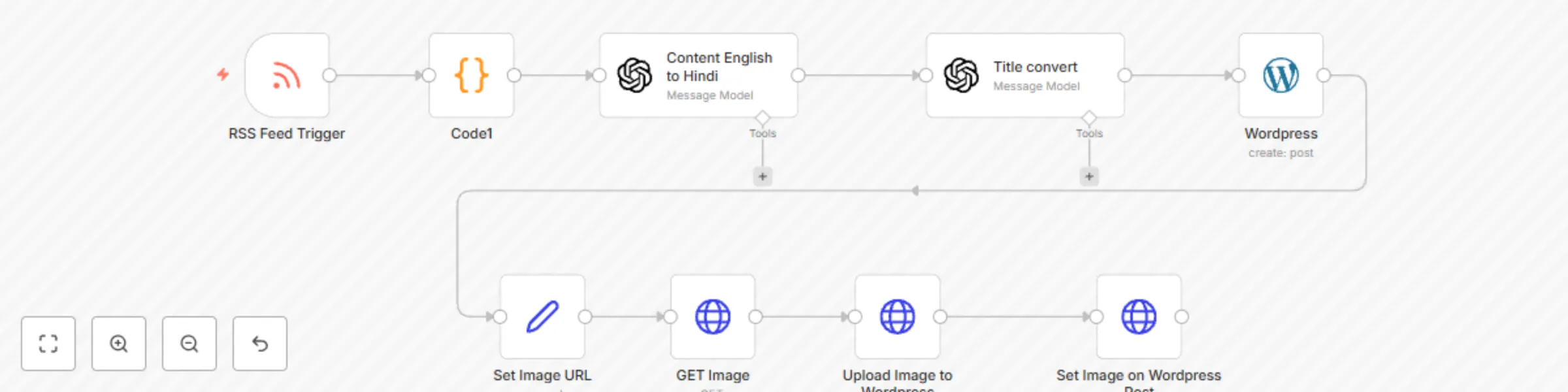
This workflow automatically pulls articles from an RSS feed, translates the content and title from English to Hindi using OpenAI, extracts the featured image from the HTML content, and publishes the translated post as a draft on a connected WordPress site. 🔧 Key Features: Polls RSS feed every 10 minutes for new articles Extracts and parses the featured image from custom HTML tags Translates content and title from English to Hindi using OpenAI Assistant Uploads the featured image to WordPress media library Associates the image with the new draft post Publishes the translated article as a draft for review 🎯 Use Case: Ideal for multi-language blog automation or content localization workflows where original content is in English and needs to be localized into Hindi before publishing.
Auto-publish PR news articles with featured images to WordPress from RSS
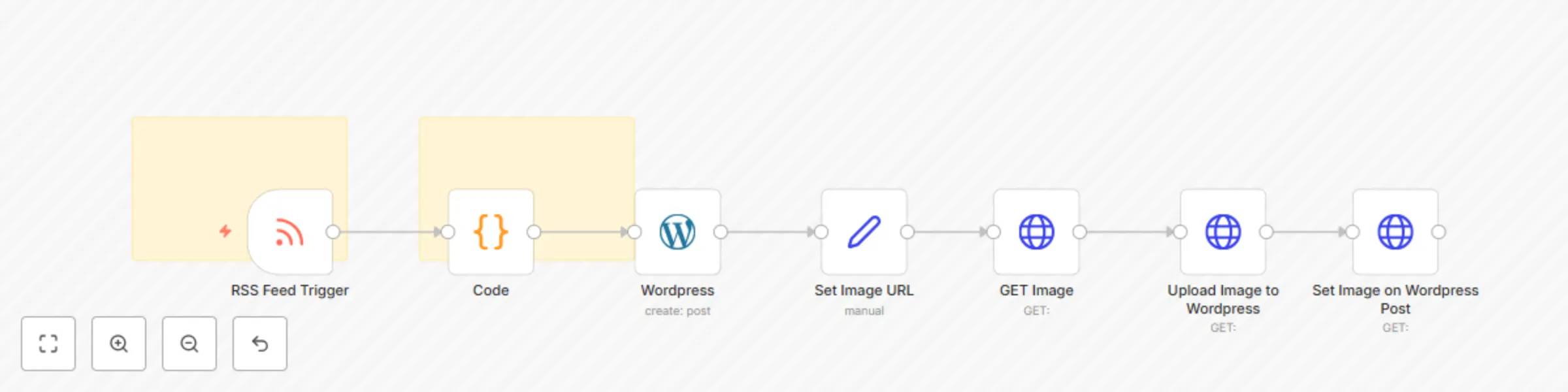
This workflow automates the process of publishing PR News articles to the WordPress website. 🔧 How it works: Uses an RSS Feed Trigger to monitor new PR News articles. Extracts the article content and parses the featured image URL. Uploads the image to WordPress as a media item. Creates a new draft post on the WordPress site using the article's content and sets the uploaded image as the featured image. ✅ Features: Polls RSS feed every minute. Automatically extracts and sets featured images. Posts are created as drafts for editorial review. 📝 Requirements: WordPress REST API access with media upload permission. Active WordPress credentials in n8n. Perfect for teams who want to streamline PR content publishing without manual effort.