D

Didarul Hhossain

2
Workflows

Workflows by Didarul Hhossain

Workflow preview: WordPress blog automation: AI SEO content, images, scheduling & email alerts
Free advanced

WordPress blog automation: AI SEO content, images, scheduling & email alerts

Description: This workflow fully automates your blog publishing process using n8n, AI, and WordPress. It pulls blog data from Google Sheets, generates SEO-optimized content with AI, creates feature images, sets meta titles & descriptions, uploads everything to WordPress, schedules posts, and sends email notifications—all without manual work. Ideal for digital marketers, content teams, and agencies who want: 🔹 High-volume blog publishing 🔹 SEO-friendly AI-generated content 🔹 Automated WordPress post creation with featured images 🔹 Optimized Google meta titles, descriptions, and URL slugs 🔹 Structured chapters, FAQs, and internal/external linking 🔹 Email notifications to alert team members or clients 🌐 What This Template Does 1. Pulls Blog Data from Google Sheets 🔹 Fetches blog post info from your Sheet: title, keywords, scheduled date, service areas, word count, style, CTA, logos, internal/external links, and more. 2. Compares Scheduled Date with Today 🔹 Ensures posts are published only on their intended date, preventing mistakes and saving time. 3. Generates AI SEO Content 🔹 Title & subtitle 🔹 Introduction (~60 words) 🔹 Multi-chapter body with logical flow 🔹 Conclusions (~60 words) 🔹 FAQ section (4–6 Q&A) 🔹 SEO-focused URL slug & meta information Chapters integrate internal links, external links, service areas, and CTAs naturally. 4. Creates Feature Images 🔹 Generates eye-catching blog feature images using dynamic text wrapping and custom fonts, ready for WordPress upload. 5. Uploads Everything to WordPress 🔹 Automates post creation, uploads images, sets featured media, and applies Yoast SEO meta info for Google and social sharing. 6. Sends Email Notifications 🔹 Automatically notifies team members or clients when a blog post is published, including post title, link, and summary. 7. Fully Marketing-Optimized Workflow 🔹 SEO-friendly structure 🔹 Brand-consistent imagery 🔹 Engaging content with clear CTAs 🔹 Automation that saves hours per post 8. Optional HTML Design for Blog Pages 🔹 Generates HTML-ready posts with clean formatting perfect for Elementor or any WordPress theme. 🛠️ Use Cases 🔹 High-volume content marketing 🔹 AI-assisted blog writing for agencies 🔹 Automated SEO optimization 🔹 Streamlined WordPress publishing 🔹 Marketing campaigns with internal/external link integration 🔹 Team/client notification workflow 🚀 Features 🔹 fully automated 🔹 Works with Google Sheets + WordPress 🔹 AI-generated SEO content 🔹 Custom feature images 🔹 Meta title & description optimized for Google 🔹 Chapter-based content structure with FAQs 🔹 Marketing-ready calls to action 🔹 Automated email notifications 📝 Tags #n8n #automation #wordpress #blogautomation #seo #contentmarketing #ai #featureimage #metaoptimization #digitalmarketing #aiwriting #workflow #emailnotifications Sample of spreadsheet: ![Spreadsheet format.PNG](fileId:3429)

D
Didarul Hhossain
Content Creation
22 Nov 2025
1648
0
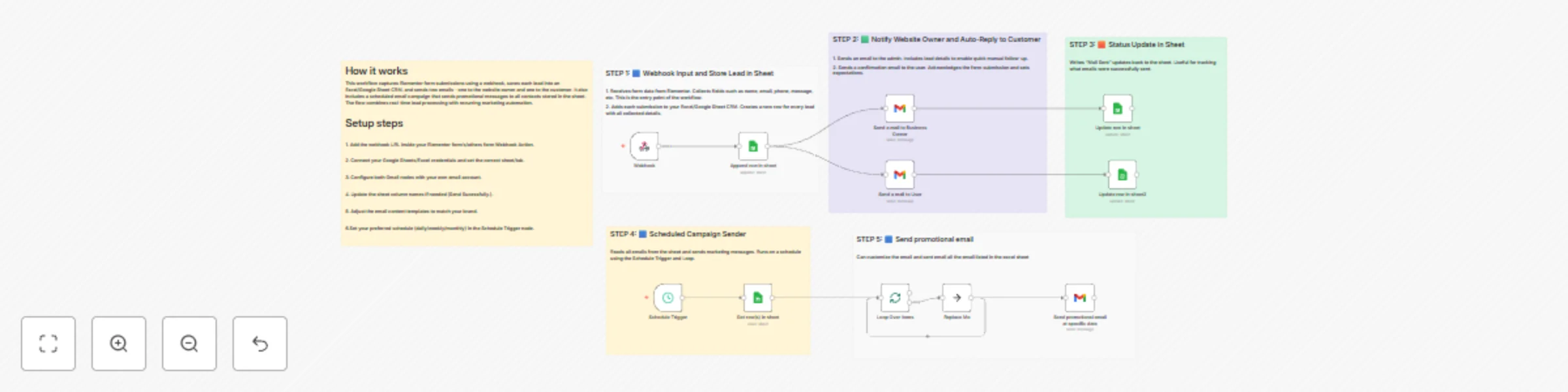
Workflow preview: Automate WordPress Elementor lead management with Excel CRM & email campaigns
Free advanced

Automate WordPress Elementor lead management with Excel CRM & email campaigns

Description This workflow automates lead collection from WordPress Elementor Forms, stores form submissions in an Excel/Google Sheet CRM, sends emails to both admin and the customer, and also performs recurring promotional email campaigns. Ideal for anyone using: Elementor Pro Form Widget Elementor-based WordPress websites Webhook-enabled contact forms This system replaces multiple plugins and services (Mailchimp, CRM plugins) with a simple, fully automated workflow. 🌐 **What This Template Does** 🟦 1. Captures Elementor Form Submissions The workflow starts with a Webhook Trigger connected to your Elementor form’s “Webhook” action. It collects: Name Email WhatsApp number Budget Project details Any custom field from Elementor 🟩 2. Saves Each Lead to Excel / Google Sheets Using the Sheets/Excel node, every form submission is stored as a new row in your CRM sheet. This helps you maintain: Lead database Contact history Budget details Customer inquiry info 🟧 3. Sends Notification Email to the Website Owner A Gmail node sends a fully formatted email to the site admin with all submission details. Useful for: Quick follow-up Lead tracking Team notifications 🟨 4. Sends Auto-Reply Email to Customer A thank-you / confirmation email is automatically sent to the customer who submitted the Elementor form. This creates: Professional communication Instant acknowledgment Trust and credibility 🟫 5. Updates Excel Sheet with Email Status After sending each email (admin & customer), an update is written back to the Excel sheet: “Owner Mail Sent: YES” “Customer Mail Sent: YES” or error logs if needed. This allows full auditability. 🟣 6. Scheduled Marketing Email Campaigns A Schedule Trigger (daily/weekly/monthly) runs your promotional email batch. It: Reads email list from your Excel/Sheet Loops through each row Sends email using Gmail node Logs “Campaign Email Sent” for each contact This gives you a built-in email marketing engine using your CRM sheet as a source. 🟤 7. Loop + Gmail Email Sender The workflow loops over each row and sends individual emails instead of bulk mailing. Benefits: Higher inbox delivery Less spam detection Personalized messaging 🛠️ Use Cases Elementor Pro Form submissions WordPress business or agency website Auto CRM creation in Excel/Google Sheets Auto-responses for submitted forms Monthly email campaigns Lead database + tracking Replace Mailchimp or CRM plugins 🚀 Features 100% No-code Works with Elementor Pro Webhook Easy to customize Full automation chain Reliable email notifications Marketing-ready system 📝 Tags #wordpress #elementor #form #automation #webhook #excel #googlesheets #crm #leadmanagement #emailautomation #gmail #marketing #promotion #autoresponder #webflow #website #automation

D
Didarul Hhossain
Social Media
20 Nov 2025
100
0