Github webhook-based n8n workflow import template
**This n8n workflow template uses community nodes and is only compatible with the self-hosted version of n8n.**
This template aims to ease the process of deploying workflows from github. It has a companion repository that developers might find useful{. See below for more details
## How it works
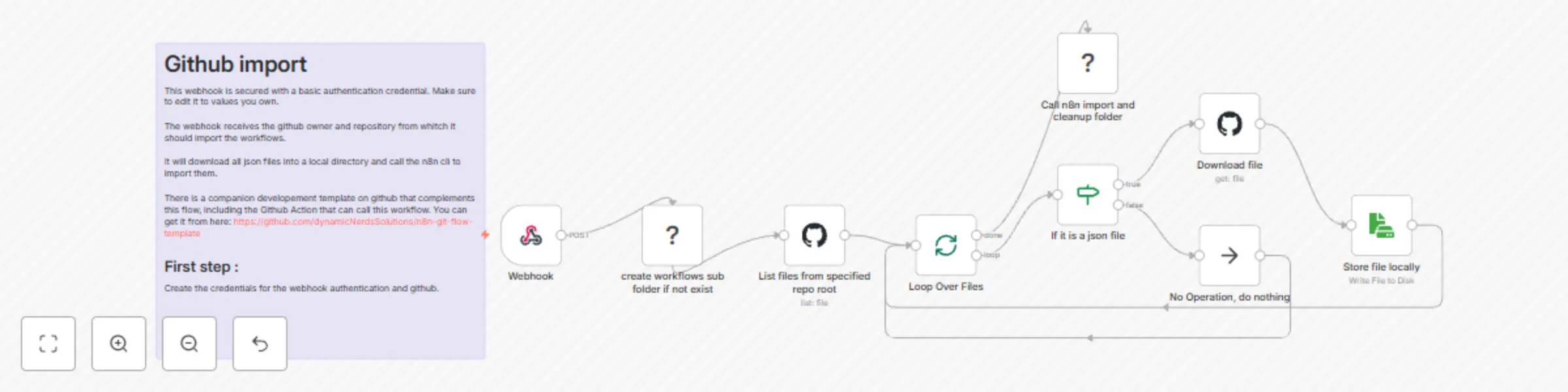
Automatically import and deploy n8n workflows from your GitHub repository to your production n8n instance using a secured webhook-based approach. This template enables teams to maintain version control of their workflows while ensuring seamless deployment through a CI/CD pipeline.
1. Receives webhook notifications from GitHub when changes are pushed to your repository
2. Lists all files in the repository and filters for `.json` workflow files
3. Downloads each workflow file and saves it locally
4. Imports all workflows into n8n using the CLI import command
5. Cleans up temporary files after successful import
To trigger the deployment, send a POST request to your webhook with the set up credentials (basic auth) with the following body:
```
{
"owner": "GITHUB_REPO_OWNER_NAME",
"repository": "GITHUB_REPOSITORY_NAME"
}
```
## Set up steps
Once importing this template in n8n :
1. Setup the webhook basic auth credentials
2. Setup the github credentials
3. Activate the workflow !
## Companion repository
There is a companion repository located at [https://github.com/dynamicNerdsSolutions/n8n-git-flow-template](https://github.com/dynamicNerdsSolutions/n8n-git-flow-template) that has a Github action already setup to work with this workflow.
It provides a complete development environment with:
- Local n8n instance via Docker
- Automated workflow export and commit scripts
- Version control integration
- CI/CD pipeline setup
This setup allows teams to maintain a clean separation between development and production environments while ensuring reliable workflow deployment.