D

David Levesque

1
Workflow

Workflows by David Levesque

Workflow preview: Monitor Dropbox folders for new files with DB comparison
Free advanced

Monitor Dropbox folders for new files with DB comparison

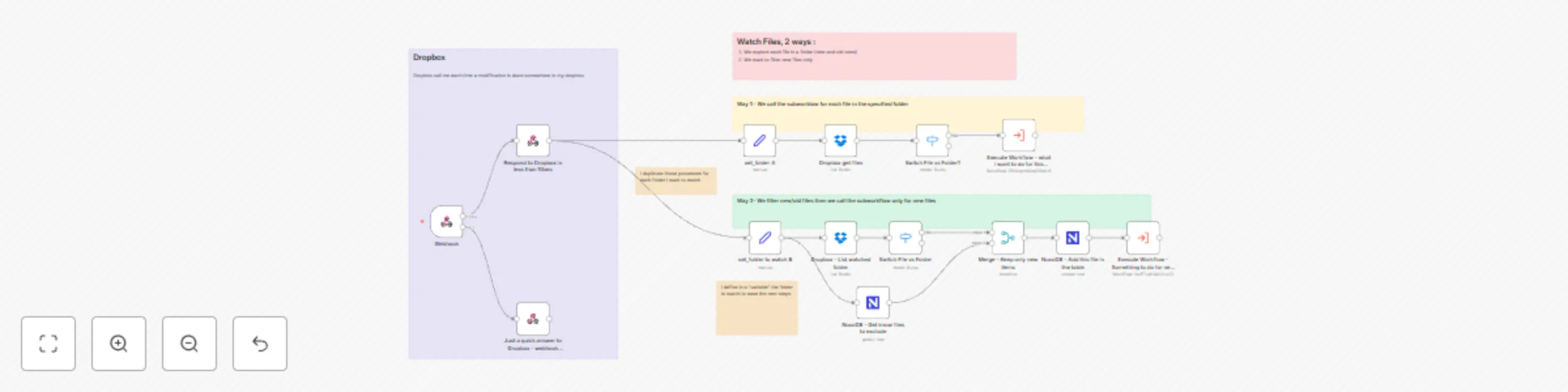
Here's the corrected English text: # Dropbox Folder Monitoring Workflow As we don't have (yet?) a Dropbox node "Watching new files" or "Watching folder", I created this central workflow to do it. ## How it works - Triggered by Dropbox webhook - I respond immediately to Dropbox to avoid webhook disabling - Then I add/duplicate one branch per monitored folder, according to my needs In my case, I need to monitor several folders, like "vocal notes to process", "transcriptions to LinkedIn posts" or "quotes to add". ### This workflow shows 2 types of folder monitoring: 1. **Way #1:** Each file in the monitored folder calls a sub-workflow 2. **Way #2:** We get all files from the monitored folder and compare them to a database. If the file is not listed in DB, i supposed it's new one. ### Way #1 - We get all files from the monitored folder 1. I set a variable `folder_to_watch` to indicate which folder to monitor. This step is here just to be homogeneous and allow setting the folder path only once in this branch. 2. I list the folder files 3. We keep only files (exclude folders) 4. Then I call the specialized sub-workflow ### Way #2 - We want only new files from the monitored folder 1. I set a variable `folder_to_watch` to indicate which folder to monitor 2. I list the folder files and keep only files 3. Meanwhile, I query my DB to get known files about this folder (I send the query to NocoDB `(folder_to_watch,eq,{{ $json.folder_to_watch }})`) 4. Now I can exclude old files and keep only new ones by merging (I compare from Dropbox file `id` - as the file could be renamed by the user) 5. I add the new file in DB to be sure to recognize it next time - I save the JSON Dropbox data: ``` { "id":"{{ $json.id }}", "name":"{{ $json.name }}", "lastModifiedClient": "{{ $json.lastModifiedClient }}", "lastModifiedServer": "{{ $json.lastModifiedServer }}", "rev": "{{ $json.rev }}", "contentSize": {{ $json.contentSize }}, "type": "{{ $json.type }}", "contentHash": "{{ $json.contentHash }}", "pathLower": "{{ $json.pathLower }}", "pathDisplay": "{{ $json.pathDisplay }}", "isDownloadable": {{ $json.isDownloadable }} } ``` 6. And now I can call my sub-workflow :) ### My DB Columns details: - `folder_to_watch` - `data` (json/text) - `timestamp` - `file_id` (Dropbox file ID, to ease future searches) ## My vision: - I have only one workflow in my n8n that monitors Dropbox folders/files - This workflow calls the required sub-workflow specialized for the tasks required - I will have as many branches as I have folders to monitor (if I have 5 different folders to watch, I will get 5 branches and 5 sub-workflows)

D
David Levesque
File Management
24 Mar 2025
1490
0