D

David Hernández Luján

1
Workflow

Workflows by David Hernández Luján

Workflow preview: Safely update n8n with version checks and Telegram notifications
Free advanced

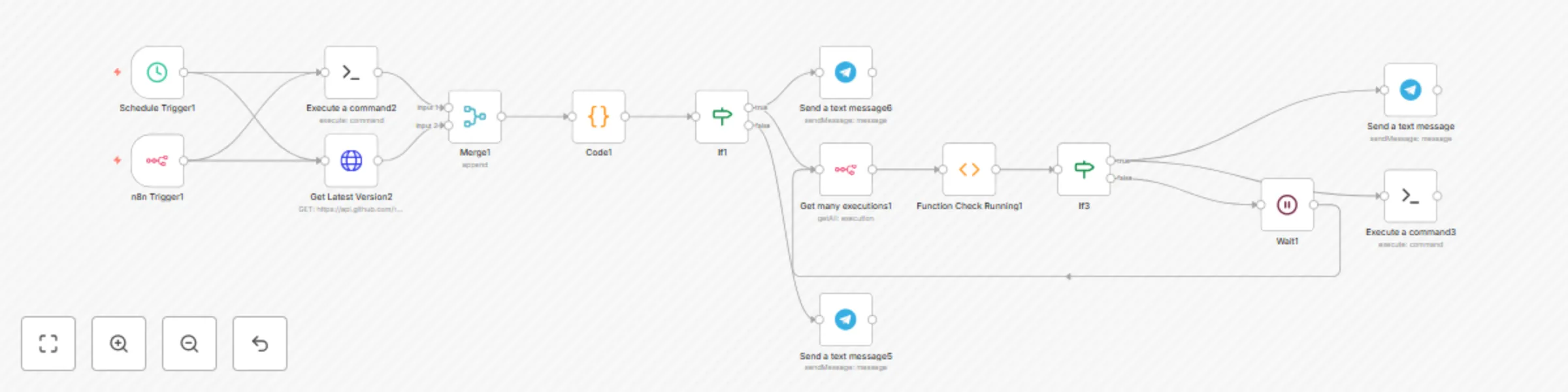
Safely update n8n with version checks and Telegram notifications

## Who’s it for This workflow is for **system administrators** or **self-hosted n8n users** who want to **automatically check and update their n8n instance** to the latest version — with Telegram notifications for every step. --- ## How it works 1. The workflow runs **daily at 9 AM** or every time n8n starts. 2. It retrieves your **current version** using the Execute Command node. 3. It checks the **latest release** from the official n8n GitHub API. 4. It compares both versions and decides whether an update is needed. 5. If an update is available: - Sends a **Telegram alert**. - Verifies that there are **no running executions**. - Runs the update command safely. - Sends a confirmation message when done. 6. If your instance is already up to date, it sends a “latest version” message instead. --- ## Requirements - **Self-hosted n8n** instance with access to run terminal commands. - A valid **Telegram Bot API credential** (configured in n8n Credentials; not hardcoded). - **SSH credentials** To run commands on the server where n8n is installed - **n8n API credentials** To query running executions --- ## How to set up 1. Import this workflow into your n8n instance. 2. Connect your **Telegram Bot credential** to the Telegram nodes. 3. Adjust the **chat ID** and **message thread ID** if needed. 4. (Optional) Change the **schedule time** in the Schedule Trigger node. 5. Save and activate the workflow. --- ## How to customize - Change the update command if you’re running n8n via Docker: ```bash docker pull n8nio/n8n:latest

D
David Hernández Luján
DevOps
17 Oct 2025
150
0