D

Dan Rahimi

1
Workflow

Workflows by Dan Rahimi

Workflow preview: Automatically sync Notion contacts to Google Contacts with group labels
Free advanced

Automatically sync Notion contacts to Google Contacts with group labels

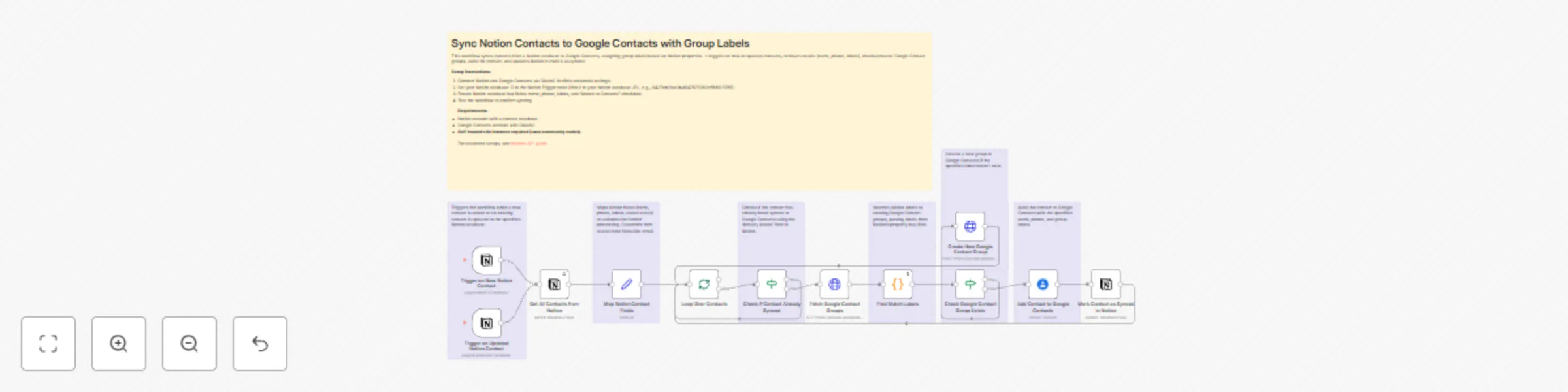
## Sync Notion Contacts to Google Contacts with Group Labels **Overview** Seamlessly transfer your Notion contacts to Google Contacts with organized group labels, simplifying your CRM management. This n8n workflow automates syncing contacts from a Notion database to Google Contacts, applying group labels based on Notion properties. It triggers on new or updated contacts, ensuring your Google Contacts are always organized without manual effort. ✨ **Key Features** 🔄 **Automatic Sync:** Updates Google Contacts when Notion entries are added or modified. 🏷️ **Group Organization:** Assigns labels to contacts based on Notion’s `property_buy` field. ✅ **Duplicate Prevention:** Marks synced contacts in Notion with a checkbox. 🛠️ **Flexible Customization:** Add fields like email in the “Map Notion Contact Fields” node. 📡 **Community Nodes:** Leverages Notion and Google Contacts nodes for integration. 📋 **Prerequisites** **Required Credentials** - **Notion API Token:** Set up OAuth2 in n8n. Get your token from [Notion’s API settings](https://developers.notion.com/). - **Google Contacts OAuth2:** Configure in n8n. See [n8n’s Google Contacts guide](https://docs.n8n.io/integrations/builtin/credentials/google/). - **Notion Database:** Must include name, phone, labels (`property_buy`), and an “Added to Contacts” checkbox. - **Self-Hosted n8n:** Required for community nodes. 🔄 **Workflow Process** 1. **Trigger:** Activates on new or updated Notion database entries. 2. **Fetch Data:** Retrieves contact details (name, phone, labels) from Notion. 3. **Map Fields:** Organizes data in the “Map Notion Contact Fields” node. 4. **Verify Groups:** Checks for existing Google Contact groups; creates new ones if needed. 5. **Sync Contacts:** Adds contacts to Google Contacts with labels. 6. **Update Notion:** Marks contacts as synced. **Result:** Organized, labeled contacts in Google Contacts, updated automatically. 📊 **Output Data Structure** - **Name:** Contact’s first name from Notion. - **Phone:** Contact’s phone number. - **Group Labels:** Assigned from Notion’s `property_buy` field. - **Sync Status:** Notion checkbox updated to confirm sync. 💡 **Pro Tips** - **Real-Time Updates:** Set the Notion Trigger node to check every minute for faster syncing. - **Expand Fields:** Add email or other fields in the “Map Notion Contact Fields” node. - **Clean Labels:** Use consistent Notion labels for better Google Contacts organization. - **Test Small:** Start with a small dataset to verify setup. 🆘 **Troubleshooting** - **Authentication Issues:** Verify Notion and Google Contacts OAuth2 credentials. - **Sync Failures:** Ensure Notion database ID and field names match the workflow. - **Group Errors:** Check that `property_buy` labels are valid. 👨‍💻 **Creator Information** 👤 **Created by: Dan Rahimi** 🌐 **Website:** [DanRahimi.com](https://DanRahimi.com) 📧 **Email:** [[email protected]](mailto:[email protected]) 📺 **YouTube:** [@DanRahimi](https://www.youtube.com/@danrahimi) 👥 **LinkedIn:** [Dan-Rahimi](https://www.linkedin.com/in/dan-rahimi) 🤝 **Support & Contributions** Enjoyed this workflow? Support my work or explore more: ☕ [**Buy Me a Coffee**](https://www.coff.ee/danrahimi) 📚 **AI Automation Courses:** Visit **[DanRahimi.com](https://DanRahimi.com)** for more articles and tutorials about AI automation. **Disclaimer:** This workflow uses community nodes and requires a self-hosted n8n instance.

D
Dan Rahimi
CRM
2 Jul 2025
454
0