Cooper
Workflows by Cooper
Generate PII-safe Helpdocs from Crisp Support chats with GPT-4.1-mini
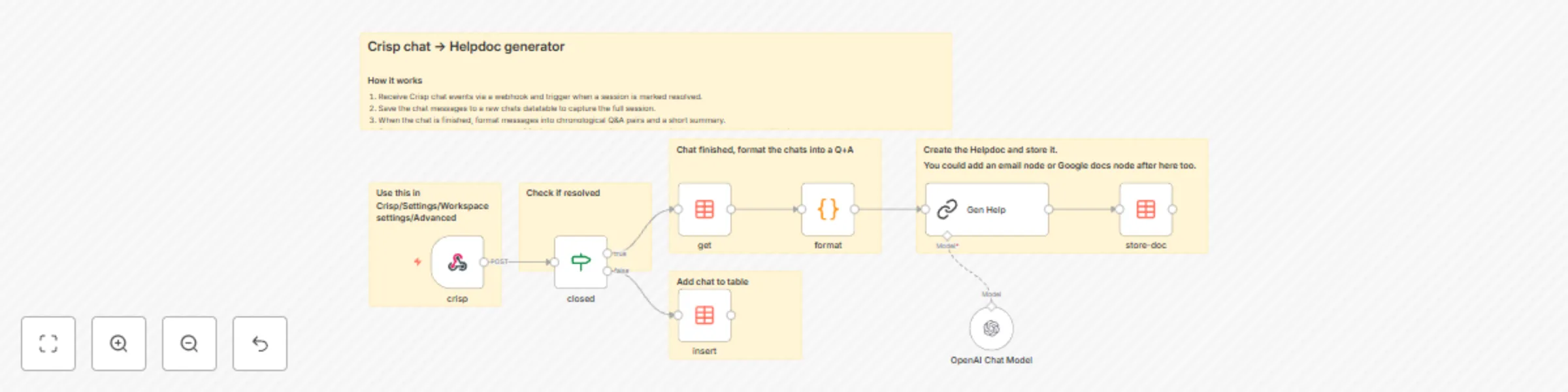
# Turn Crisp chats into Helpdocs Automatically create help articles from resolved Crisp chats. This n8n workflow listens for chat events, formats Q&A pairs, and uses an LLM to generate a PII‑safe helpdoc saved to a Data Table. --- ## Highlights * 🧩 **Trigger:** Crisp Webhook when a chat is marked resolved. * 🗂️ **Store:** Each message saved in a Data Table (`crisp`). * 🧠 **Generate:** LLM turns Q&A into draft helpdoc. * 💾 **Save:** Draft stored in another Data Table (`crisphelp`) for review. --- ## How it works 1. **Webhook** receives `message:send`, `message:received`, and `state:resolved` events from Crisp. 2. **Data Table** stores messages by `session_id`. 3. On `state:resolved`, workflow fetches the full chat thread. 4. **Code** node formats messages into `Q:` and `A:` pairs. 5. **LLM** (OpenAI `gpt-4.1-mini`) creates a redacted helpdoc. 6. **Data Table** `crisphelp` saves the generated doc with `publish = false`. ---  --- ## Requirements * Crisp workspace with webhook access (Settings → Advanced → Webhooks) * n8n instance with Data Tables and OpenAI credentials --- ## Customize * Swap the model in the LLM node. * Add a Slack or Email node after `store-doc` to alert reviewers. * Extend prompt rules to strengthen PII redaction. --- ## Tips * Ensure Crisp webhook URL is public. * Check IF condition: `{{$json.body.data.content.namespace}} == "state:resolved"`. * Use the `publish` flag to control auto‑publishing. --- **Category:** AI • Automation • Customer Support
Convert DMARC reports to readable tables with Gmail automation
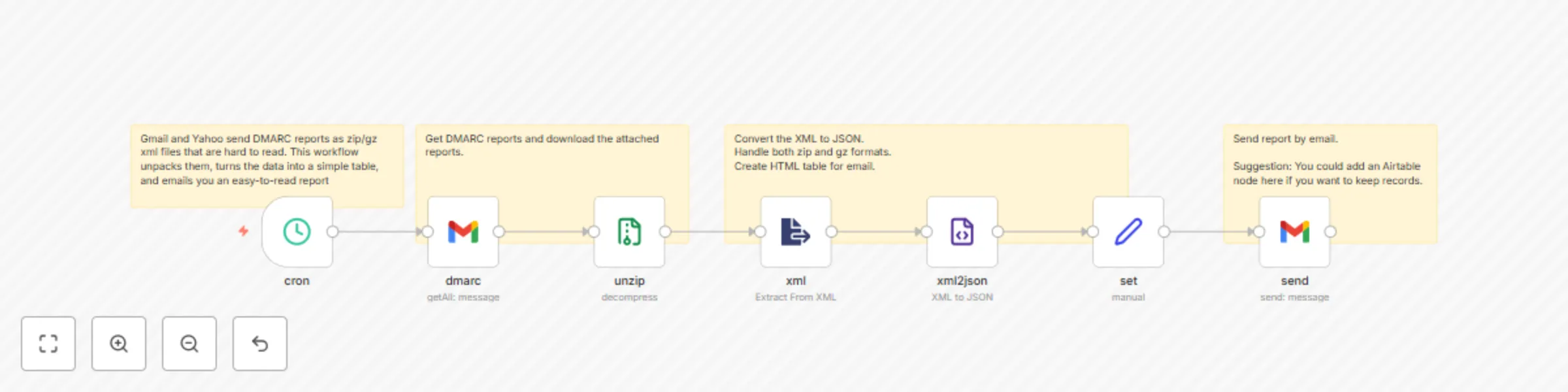
**DMARC Reporter** Gmail and Yahoo send DMARC reports as `.zip` or `.gz` xml attachments that can be hard to read. This workflow unpacks them on a schedule, turns the data into a simple table, and emails you an easy-to-read report.  ##### DMARC insights at a glance: - Confirm that your published policy is correct and consistent. - Quickly spot unknown or suspicious IPs trying to send as you. - Distinguish between legitimate high-volume senders (e.g. your ESP) and one-off or small-scale abuse. - Makes it easy to confirm your legitimate servers are authenticating correctly, and to detect spoofed mail that fails DKIM/SPF. ##### Who is this For? - Email Marketing Team - Mailchimp, Sensorpro, Omnisend users - Compliance Team ##### Customize: - Adjust the Gmail node to include other DMARC reporters by changing the search parms. - If not using Gmail you can use any of the n8n email nodes. - To keep a record, add an Airtable node after the Set node.
Multimodal chat assistant with GPT-4o for text, images, and PDFs
### Chat with thing This n8n template lets you build a smart AI chat assistant that can handle text, images, and PDFs — using OpenAI's GPT-4o multimodal model. It supports dynamic conversations and file analysis, making it great for AI-driven support bots, personal assistants, or embedded chat widgets. --- ### 🔍 How it Works - The chat trigger node kicks off a session using n8n's hosted chat UI. - Users can send text or upload images or PDFs — the workflow checks if a file was included. - If an image is uploaded, the file is converted to base64 and analyzed using GPT-4o's vision capabilities. - GPT-4o generates a natural language description of the image and responds to the user's question in context. - A memory buffer keeps track of the conversation thread, so follow-up questions are handled intelligently. - OpenAI’s chat model handles both text-only and mixed media input seamlessly. --- ### 🧪 How to Use - You can embed this in a website or use it with your own webhook/chat interface. - The logic is modular — just swap out the `chatTrigger` node for another input (e.g. form or API). - To use with documents, you can modify the logic to pass PDF content to GPT-4 directly. - You can extend it with action nodes, e.g. saving results to Notion, Airtable, or sending replies via email or Slack. --- ### 🔐 Requirements - Your OpenAI GPT-4o API key - Set File Upload on the chat ### 🚀 Use Cases - PDF explainer bot - Internal knowledge chat with media support - Personal assistant for mixed content