V

Vasu Gupta

2
Workflows

Workflows by Vasu Gupta

Workflow preview: Text-to-video generator & social media publisher with Fal.ai and Telegram approval
Free advanced

Text-to-video generator & social media publisher with Fal.ai and Telegram approval

## AI Video Generator & Social Media Publisher (Telegram Bot) Turn a single text message into a fully produced video and publish it across 5 social media platforms automatically. This workflow combines AI video generation (Fal.ai) with a "Human-in-the-loop" approval system via Telegram, ensuring you never post content without checking it first. ## Who is this for? - Social Media Managers who want to automate Short/Reel creation. - Content Creators looking to scale their output on Instagram, TikTok, and YouTube. - Brands that need consistent, on-brand video content generated from simple text prompts. ## How it works 1. **Trigger:** Send a text message to your Telegram bot (e.g., "A futuristic city with neon lights"). 2. **AI Drafting:** An AI Agent (GPT-4o) converts your message into a detailed cinematic video prompt based on your brand guidelines. 3. **Generation:** Fal.ai (Veo3 model) generates a high-quality 9:16 video. 4. **Approval Loop:** The bot sends you the video preview. - Reply **"Great"**: The workflow proceeds to publishing. - Reply with **feedback** (e.g., "Too dark, make it brighter"): The AI refines the prompt and regenerates the video. 5. **Publishing:** Once approved, the workflow generates platform-specific captions and hashtags, logs the post to Google Sheets, and uploads the video to Blotato to publish on Instagram, Facebook, LinkedIn, TikTok, and YouTube Shorts. ## Requirements - **OpenAI API Key** - **Fal.ai API Key** (for video generation) - **Telegram Bot Token** - **Google Sheets** (for logging posts) - **Blotato Account** (for multi-channel publishing) ## How to set up 1. **Credentials:** configure your credentials for OpenAI, Fal.ai, Telegram, Google Sheets, and Blotato. 2. **Fal.ai Setup:** Create a **Header Auth** credential named `Authorization` with value `Key <YOUR_FAL_KEY>`. 3. **Google Sheets:** In the "Log to Google Sheets" node, select the specific Sheet you want to use for tracking. 4. **Blotato:** In the 5 publishing nodes (Instagram, Facebook, etc.), select your specific Account IDs from the dropdowns. 5. **Brand Customization:** Open the "Draft Video Prompt" and "Generate Caption" nodes to edit the System Prompt with your specific brand voice and aesthetic guidelines.

V
Vasu Gupta
Content Creation
25 Dec 2025
73
0
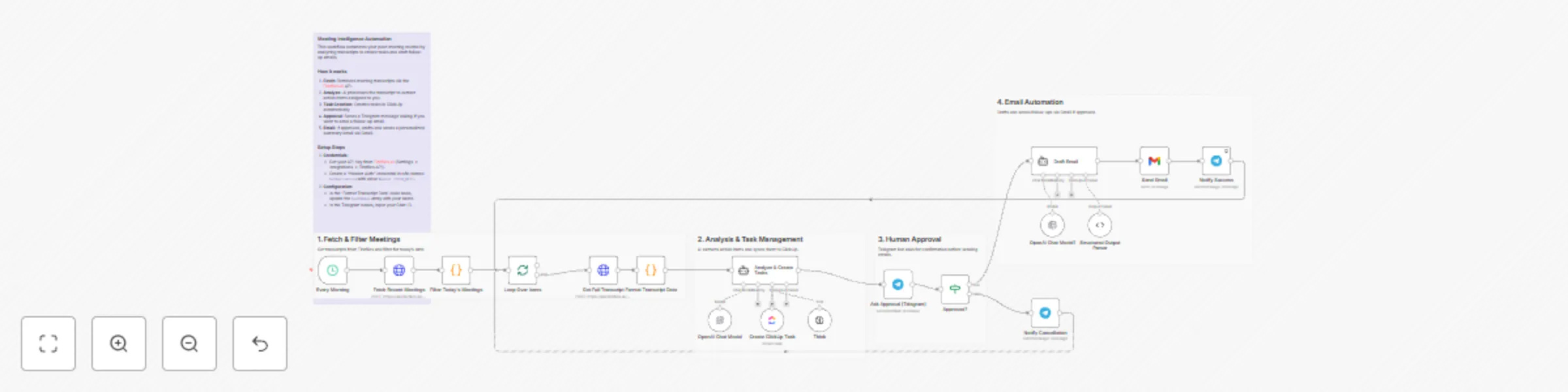
Workflow preview: Automate post-meeting tasks with Fireflies, GPT-4o & ClickUp
Free advanced

Automate post-meeting tasks with Fireflies, GPT-4o & ClickUp

## AI Meeting Assistant: Sync Fireflies Transcripts to ClickUp & Gmail Act as your personal executive assistant with this high-level automation designed to handle the most tedious post-meeting tasks. This workflow ensures that no action item is forgotten and that participants receive professional follow-ups without you having to lift a finger. ## Who is this for? - Busy executives and managers who have back-to-back meetings. - Project managers who need to sync action items directly into ClickUp. - Sales teams who want to automate professional follow-up emails based on meeting context. ## How it works 1. **Fetch Transcripts:** The workflow runs on a schedule and retrieves your latest meeting data directly from the Fireflies.ai API using HTTP nodes. 2. **Intelligent Filtering:** A JavaScript node filters the list to process only today's meetings. 3. **AI Task Extraction:** An AI Agent (using GPT-4o-mini) analyzes the transcript to find tasks specifically assigned to the host. It then uses the ClickUp tool to create these tasks with priorities and descriptions. 4. **Human-in-the-Loop:** To ensure quality, the workflow sends a summary to your Telegram. It asks for approval before sending any external emails. 5. **Automated Follow-up:** Once approved, a second AI Agent drafts a concise, professional email summary and sends it via Gmail to the external participants. ## Requirements - **Fireflies.ai Account:** You need an API Key (Settings -> Integrations -> Fireflies API). - **OpenAI API Key:** To power the AI Agents. - **ClickUp Workspace:** To manage the generated tasks. - **Telegram Bot:** For the approval notifications. - **Gmail Account:** For sending the follow-up emails. ## How to set up 1. **Fireflies API Key:** Create a **Header Auth** credential in n8n. Set the Name to `Authorization` and the Value to `Bearer YOUR_API_KEY_HERE`. 2. **Configure Credentials:** Add your credentials for OpenAI, ClickUp, Telegram, and Gmail. 3. **ClickUp Configuration:** In the "Create ClickUp Task" node, select your specific Workspace, Space, and List from the dropdown menus. 4. **Identity Setup:** Open the "Format Transcript Data" code node. Update the `hostNames` array with your name and aliases (e.g., `['Host', 'My Name']`) so the AI correctly identifies you. 5. **Telegram Chat ID:** Enter your Chat ID in the Telegram nodes to receive the approval prompts.

V
Vasu Gupta
Project Management
25 Dec 2025
40
0