C

CentralStationCRM

4
Workflows

Workflows by CentralStationCRM

Workflow preview: Automated email follow-up system with CentralStationCRM, Gmail and Slack alerts
Free advanced

Automated email follow-up system with CentralStationCRM, Gmail and Slack alerts

How it works * time trigger using the cron format, every weekday at 5pm * gets CentralStationCRM people updates of today * checks for tag "Outreach" * if true, sends message on gmail (predefine in node) * waits 7 days, checks for answers * alerts user if an answer is there * if not, repeats process with second mail How to set up * get credentials for CentralStationCRM, Slack and GMail * set up the respective nodes with the credentials * define text for your automated mails * test without wait nodes

C
CentralStationCRM
Lead Nurturing
24 Oct 2025
32
0
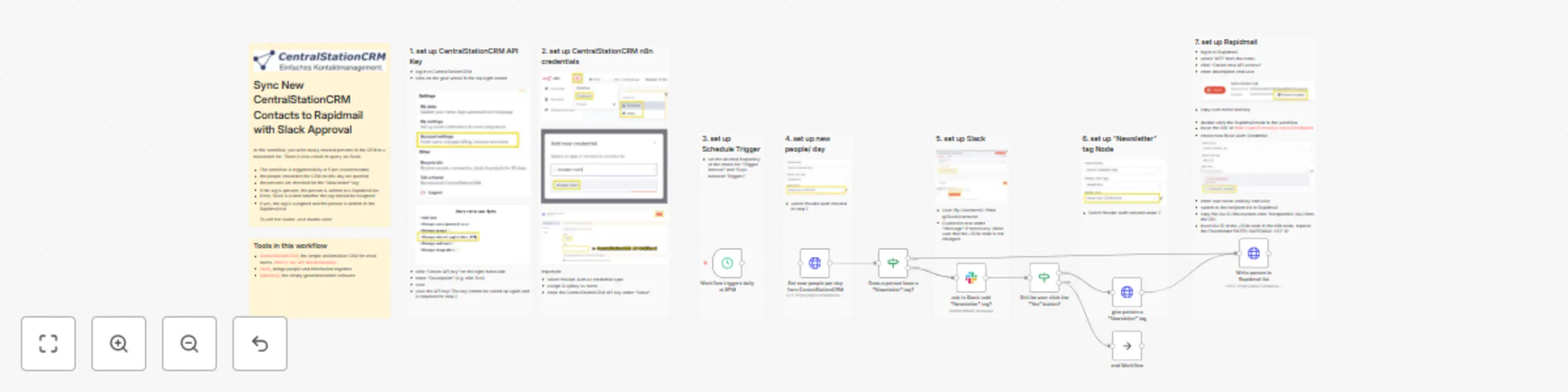
Workflow preview: Syncing contacts with CentralStationCRM, Rapidmail, and Slack
Free advanced

Syncing contacts with CentralStationCRM, Rapidmail, and Slack

## Workflow Overview This workflow benefits anyone who: * wants to automate writing new contacts (with an associated 'Newsletter' tag) in CentralStationCRM to a Rapidmail list ## Tools in this workflow * [CentralStationCRM](https://centralstationcrm.de), the simple and intuitive CRM for small teams. [Here is our API documentation](https://api.centralstationcrm.net/api-docs/index.html) if you want to modify the workflow. * [Slack](https://slack.com/intl/de-de), brings people and information together * [Rapidmail](https://rapidmail.de), the really good newsletter software ## Workflow Screenshot ![CSCRMtoRapidmailwithslackapproval.jpg](fileId:1847) ## Workflow Description This workflow consists of: * a schedule trigger (set to 5 pm/daily) * three HTTP Requests to the CentralStationCRM API * two if-Nodes as logic gates * a Slack node * a "Do nothing, end workflow" node ### The schedule trigger The schedule trigger is set to trigger at 5 pm, every day. The thinking here: If you added new contacts into CentralStationCRM during your workday, the workflow will collect them afterwards. You can of course set your own time. ### First HTTP Request: Get new people of the day This node talks to the CentralStationCRM API and gets every newly created person of the day. Included are the tags, adresses, associated companies, and emails of the person. ### First if-gate: Does the person have a "Newsletter" tag? If you tagged your person with "Newsletter" in CentralStationCRM after creating it, this if-node will see it. -> if true: go to last HTTP Request (Rapidmail list) -> if false: go to Slack node ### Slack node: ask if the person should get a "Newsletter" tag Pretty much what the title says. The slack user sees a private message with the question "Should <person> be on your newsletter list" and can click "yes" or "no". ### second if-gate: Did the user click the "Yes"-button? -> if false: end workflow (do nothing node) -> if true: go to second HTTP request node ### second HTTP request: give person a "Newsletter" tag in CentralStationCRM This node again talks to the CentralStationCRM API and creates a new tag for the person, called "Newsletter". This is so you know later that this person is also receiving your newsletter. ### last HTTP request node: write person's name and email on Rapidmail list This node uses the Rapidmail API and the Rapidmail list ID to write a person with the "Newsletter" tag on a pre-created Rapidmail list for your newsletter. ## Customization ideas With this workflow, you could * change the interval the workflow triggers, i.e. to once per week. you'd have to change the JSON code in the second node to fetch all the new people per week instead of per day * customize the slack approval message to include more information on the person than the name, i.e. the company the person works for * take the beginning - give tag to person in CentralStationCRM, trigger workflow, check for tag, ask for approval in slack - and then do something else with the last node, i.e. write the person a mail in Gmail or write their info in a Google sheet or do a web research with ai on the person. Go experiment ab bit! ## Preconditions For this workflow, you need: * a CentralStationCRM account with API access * an n8n account with API access * a Rapidmail account with API access * a Rapidmail recipient list ## Have fun with our workflow!

C
CentralStationCRM
Social Media
18 Jul 2025
113
0

Workflow preview: Send postcards to contacts automatically using CentralStationCRM and EchtPost
Free intermediate

Send postcards to contacts automatically using CentralStationCRM and EchtPost

## Workflow Overview This workflow benefits anyone, who: * wants to automate sending Postcards to tagged CentralStationCRM contacts ## Tools in this Workflow * [CentralStationCRM](https://centralstationcrm.de) - the simple and intuitive CRM Software for small teams. * [EchtPost](https://echtpost.de) - send postcards online ## Workflow Screenshot ![Send Postcards to Contacts Automatically using CentralStationCRM and EchtPost n8n 20250723 at 4.29.30 PM.jpg](fileId:1848) ## Workflow Description This workflow consists of: * a webhook trigger * a set node * an if node * an HTTP request ### The Webhook Trigger The webhook triggers when a person is updated in CentralStationCRM. The persons data is sent to n8n, including the company name and the address. ### The Set node This node filters the webhook data for just the data the EchtPost node needs. It also transforms the country field to the associated country code (i.e. "Deutschland" -> "DE") ### The if node This node checks if there is an "EchtPost" tag in the persons data. -> if false: do nothing -> if true: go to HTTP request ### The HTTP Request This node sends the persons name, address and country code alongside with the id of the EchtPost template (inserted manually in the node) to EchtPost. It also needs an E-Mail-Adress for a confirmation mail. The data starts a "Mail in 3 days" process with the EchtPost service, which mails a postcard with that template to the person. ## Preconditions For this workflow, you need: * a CentralStationCRM account with API access * an EchtPost account with API access * an EchtPost template, with a message, and the templates ID

C
CentralStationCRM
Lead Nurturing
18 Jul 2025
97
0

Workflow preview: Auto-enrich new CRM companies with ChatGPT web research via Tavily
Free advanced

Auto-enrich new CRM companies with ChatGPT web research via Tavily

## Overview This template benefits anyone who wants to: * automate web research on a prospect company * compile that research into an easily readable note and save the note into CentralStationCRM ## Tools in this workflow * [CentralStationCRM](https://centralstationcrm.de), the easy and intuitive CRM Software for small teams. [Here is our API Documentation](https://api.centralstationcrm.net/api-docs/index.html) if you want to customize the workflow. * [ChatGPT](https://openai.com), the well-known ai chatbot * [Tavily](https://www.tavily.com/), a web search service for large language models ## Disclaimer Tavily Web Search is (as of yet) a community node. You have to activate the use of community nodes inside your n8n account to use this workflow. ## Workflow Screenshot ![AutoEnrich New CRM Companies with ChatGPT Web Research via Tavily n8n.jpg](fileId:1843) ## Workflow Description The workflow consists of: * a webhook trigger * an ai agent node * an http request node ### The Webhook Trigger The Webhook is set up in CentralStationCRM to trigger when a new company is created inside the CRM. The Webhook Trigger Node in n8n then fetches the company data from the CRM. ### The AI Agent Node The node uses ChatGPT as ai chat model and two Tavily Web Search operations ('search for information' and 'extract URLs') as tools. Additionally, it uses a simple prompt as tool, telling the ai model to re-iterate on the research data if applicable. The AI Agent Node takes the Company Name and prompts ChatGPT to "do a deep research" on this company on the web. "The research shall help sales people get a good overview about the company and allow to identify potential opportunities." The AI Agent then formats the results into markdown format and passes them to the next node. ### The CentralStationCRM protocol node This is an HTTP Request to the CentralStationCRM API. It creates a 'protocol' (the API's name for notes in the CRM) with the markdown data it received from the previous node. This protocol is saved in CentralStationCRM, where it can easily be accessed as a note when clicking on the new company entry. ## Customization ideas Even though this workflow is pretty simple, it poses interesting possibilities for customization. For example, you can alter the Webhook trigger (in CentralstationCRM and n8n) to fire when a person is created. You have to alter the AI prompt as well and make sure the third node adds the research note to the person, not a company, via the CentralStationCRM API. You could also swap the AI model used here for another one, comparing the resulting research data and get a deeper understanding of ai chat models. Then of course there is the prompt itself. You can definitely double down on the information you are most interested in and refine your prompt to make the ai bot focus on these areas of search. Start experimenting a bit! ## Preconditions For this workflow to work, you need * a CentralStationCRM account with API Access * an n8n account with API Access * an Open AI account with API Access ## Have fun with our workflow!

C
CentralStationCRM
Lead Generation
17 Jul 2025
723
0