Candra Reza
Workflows by Candra Reza
Sync new Shopify products to Odoo
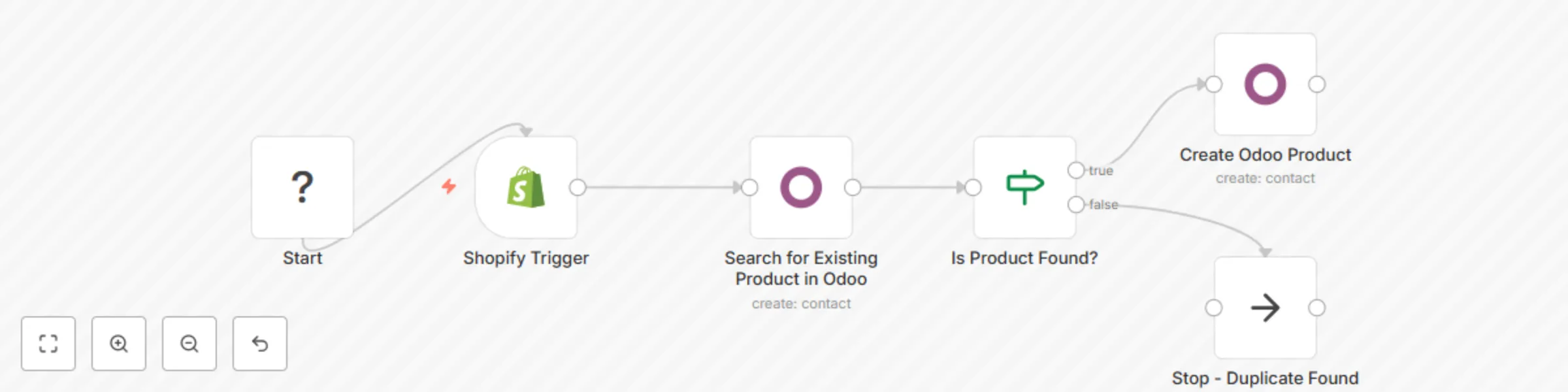
Seamlessly sync newly created Shopify products into Odoo with this smart, no-code n8n workflow. It automatically checks for duplicates and creates new products only when needed – fully compatible with a standard Odoo setup. **🚀 Key Features:** - **Trigger-based Automation:** The workflow starts instantly when a new product is created in your Shopify store. - **Intelligent Duplicate Check:** It searches for an existing product in Odoo using the Shopify product's SKU as the Internal Reference. - **Smart Conditional Logic:** - If a matching product is found, the workflow automatically stops to prevent creating duplicates. - If no match is found, it proceeds to create a new product in Odoo. - **Automatic Product Creation:** Creates a new Odoo product by mapping the following data from Shopify: - Product Name - Public Price - Internal Reference - Description - **Universal Compatibility:** Works with both Odoo Community and Enterprise editions without any custom modules. - **Fully Customizable:** The workflow is open and can be easily extended in the n8n canvas to add more fields or custom logic. **🛠 Requirements:** - An n8n instance (self-hosted or cloud). - Shopify credentials with API access. - Odoo credentials with standard XML-RPC API access. **💡 Use Case:** This workflow is the perfect solution for any business that regularly adds new products to Shopify and needs them automatically mirrored in Odoo for inventory, sales, or accounting purposes. Eliminate manual data entry, save time, and ensure your product catalogs are always in sync.
Automated company research & lead enrichment with GPT-4o and Google Sheets
Supercharge your sales and marketing with this AI-powered workflow! 🚀 Stop wasting hours on manual company research. This template deploys an autonomous AI agent that takes a list of company names from a Google Sheet, scours the web to find critical information, and automatically updates your sheet with the enriched data. **What it does:** - Reads a list of companies to research from a Google Sheet. - Uses an AI agent equipped with Google Search and web scraping tools. - Extracts key data points like LinkedIn URLs, pricing details, integrations, market focus (B2B/B2C), and more. - Structures the output into a clean JSON object. - Updates the original Google Sheet with the new information. **Key Features & Customization:** This workflow is built to be easily customized. You can modify the AI's prompt in the "AI company researcher" node and adjust the "Structured Output Parser" to gather any public data point you need, such as recent news, key executives, or their technology stack. **Required Credentials:** - OpenAI - Google Sheets - SerpApi or ScrapingBee for search capabilities
Audit & monitor SEO performance with GPT-4 Advisor, PageSpeed Insights & Slack alerts
Unleash the full potential of your website's search engine performance and user experience with this **all-in-one n8n automation template**. Designed for SEO professionals and webmasters, this suite provides **meticulous on-page and technical SEO auditing**, deep insights into **Core Web Vitals (LCP & INP)**, and an intelligent **AI-powered chatbot** for instant insights and troubleshooting. **Key Features:** - **Comprehensive On-Page SEO Audit**: Automatically checks for **missing or malformed titles, meta descriptions, H1s (including multiple H1s), missing alt text on images, and canonical tag issues.** - **Detailed Technical SEO Scan**: Verifies **HTTPS implementation, robots.txt accessibility and content**, and **sitemap.xml** presence. - **Core Web Vitals Monitoring**: Leverages **Google PageSpeed Insights** to continuously track and alert on critical performance metrics like **Largest Contentful Paint (LCP)** and **Interaction to Next Paint (INP)**. - **AI-Powered Analysis & Recommendations**: Integrates advanced AI models (ChatGPT, Claude, or Gemini) to **analyze audit findings**, provide **actionable recommendations** for improvements, and even suggest better alt text for images based on content context. - **Intelligent SEO Chatbot**: A dynamic chatbot triggered by webhooks understands natural language queries, extracts entities (URLs, keywords, SEO topics), and provides **instant, AI-generated answers** about SEO best practices, Core Web Vitals explanations, or even specific site data (via Google Search Console integration). - **Automated Reporting & Alerts**: Logs all audit data to **Google Sheets** for historical tracking and sends **real-time Slack alerts** for critical SEO issues or performance degradations. Streamline your SEO workflow, ensure optimal website health, and react swiftly to performance challenges. This template is your ultimate tool for staying ahead in the competitive digital landscape.
Sync Facebook/Google lead ads to Google Sheets & Salesforce CRM
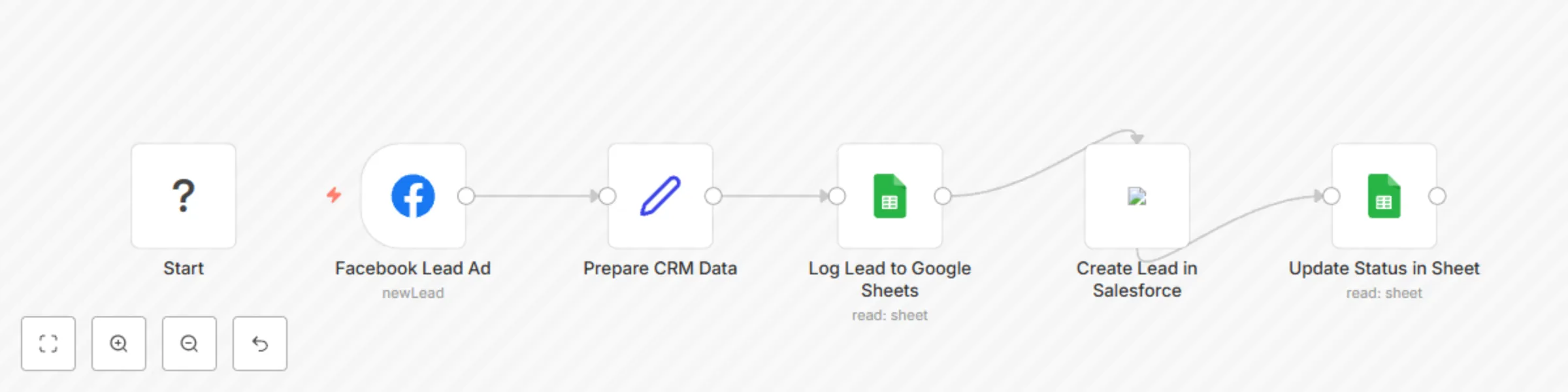
Stop wasting time on manual data entry and instantly engage with your new leads! This powerful and production-ready n8n workflow automates the entire process of capturing leads from **Facebook Lead Ads** (or **Google Ads Lead Forms**), creating a backup in **Google Sheets**, and adding them directly into your **CRM** like Salesforce. This template is designed for marketers, sales teams, and agencies who want to ensure every lead is tracked and actioned immediately, improving conversion rates and maintaining a clean, organized database. **How It Works** This workflow follows a logical and robust sequence: - **Instant Trigger**: The workflow instantly starts when a new lead is submitted on your connected Facebook Lead Ad form. - **Smart Data Prep**: A **Set** node automatically processes the incoming data, intelligently splitting the 'full_name' field into 'First Name' and 'Last Name' to ensure compatibility with standard CRM fields. - **Reliable Backup**: The lead details are immediately appended to a new row in a specified Google Sheet. This serves as a permanent, easy-to-access log of all your leads. A "Processing" status is added. - **CRM Integration**: The formatted lead data is used to create a new **Lead** in Salesforce. This can be easily swapped for other CRMs like HubSpot, Pipedrive, Zoho, or any custom CRM with an API. - **Status Confirmation**: After the lead is successfully created in the CRM, the workflow goes back to the Google Sheet and updates the lead's status from "Processing" to "Synced," giving you a clear, at-a-glance overview of your sync status. **Key Features** - **Multi-Platform Ready**: Primarily set up for Facebook Lead Ads, but the trigger can be easily swapped with the **Google Ads Lead Form Trigger** node for Google-based campaigns. - **Data Integrity**: Includes a data preparation step to clean and structure information before sending it to your CRM. - **Failsafe Logging**: Google Sheets integration ensures you never lose a lead, even if there's a temporary issue with your CRM. - **Closed-Loop Reporting**: The status update feature provides clear confirmation within your spreadsheet that the automation was successful for each lead. - **Highly Customizable**: Easily adapt the workflow to handle custom fields from your lead forms and map them to any field in your CRM. **Setup Instructions** 1. Import Template: Add this workflow to your n8n canvas. 2. Configure Trigger: - Select the **Facebook Lead Ad** node. - Create or select your Facebook Lead Ads API credentials. - Choose the correct **Page** and **Form** you want to track from the dropdown lists. - (Optional: To use Google Ads, delete the Facebook node and add the 'Google Ads Lead Form Trigger' node instead, then connect it to the 'Prepare CRM Data' node.) 3. Configure Google Sheets: - Select the **Log Lead to Google Sheets** node. - Create or select your Google Sheets API credentials. - Enter your Spreadsheet ID and the Sheet Name (e.g., "Leads"). - Ensure your sheet has the following headers: **Timestamp, FullName, Email, PhoneNumber, LeadID, CRM_Status**. - The **Update Status in Sheet** node will automatically use the same credentials and sheet details. 4. Configure Your CRM: - Select the **Create Lead in Salesforce** node. - Create or select your Salesforce API credentials. - Review the mapped fields. You can add any custom fields from your form by referencing the data from the trigger node (e.g., **{{$nodes["Facebook Lead Ad"].json.custom_field_name}}**). 5. Activate Workflow: Save and activate your workflow to start automating your lead management! This automation will save you hours of administrative work, eliminate human error, and ensure your sales team can follow up with hot leads faster than ever.
Track expenses from receipt photos with Telegram & Google Sheets using OCR.space
Hello automation enthusiasts! 👋 Want to automatically track your expenses from receipts without hefty OCR service costs? I've got you covered! I've updated my Personal Finance Tracking Chatbot template to incorporate a **free OCR service (OCR.space)**. This powerful n8n workflow lets you effortlessly log your expenses by **sending a picture of your receipt to your Telegram bot**. The OCR will extract key details like amount, date, and description, which are then neatly saved into your **Google Sheets**! **Why use this template?** - 📸 Free OCR-Powered Expense Tracking: Simply send a photo of your receipt to your Telegram bot and let OCR.space do the heavy lifting – without breaking the bank! - 📊 Automated Google Sheets Entry: Extracted data is seamlessly appended to your Google Sheet for easy financial overview. - 💰 Manual Entry Still Available: Easily record incomes and expenses via text commands for transactions without receipts. - 🤖 Instant Telegram Confirmations: Get immediate feedback on successful recordings, whether manual or OCR-processed. - ✨ Customizable Parsing: The included Function node allows you to refine the data extraction logic to perfectly match your receipt formats. **What Do You Need?** - An n8n account (self-hosted or cloud) - Your own Telegram Bot (free and easy to create!) - A **free API Key from OCR.space**. - A Google account and an empty Google Spreadsheet for your financial data. - A Google Spreadsheet with "Income" and "Expenses" sheets (with columns like ***Date, Description, Amount, Category, Type, Source***). **Who Is This For?** This template is perfect for anyone who wants to gain more control over their personal finances in an efficient and hassle-free way. No more complex apps, just use your personal chatbot! **How to Use It?** 1. **Get Your Free OCR.space API Key**: Visit [ocr.space/OCRAPI](https://ocr.space/OCRAPI) and sign up for a free key. 2. **Import this JSON template** into your n8n instance. 3. **Configure Credentials**: Set your Telegram Bot Token, Google Sheet ID, and OCR.space API Key as environment variables in n8n. 4. **Activate the workflow.** 5. Start tracking your finances by sending text commands (e.g., income salary 5000, expense coffee 15 food) or just snapping a photo of your receipt to your Telegram bot! Let's simplify your financial management with automation! Feel free to try it out and modify it to suit your needs. If you have any questions, leave a comment below!