C

Cai Yongji

1
Workflow

Workflows by Cai Yongji

Workflow preview: Automate GitHub trending data collection with FireCrawl, GPT and Supabase
Free intermediate

Automate GitHub trending data collection with FireCrawl, GPT and Supabase

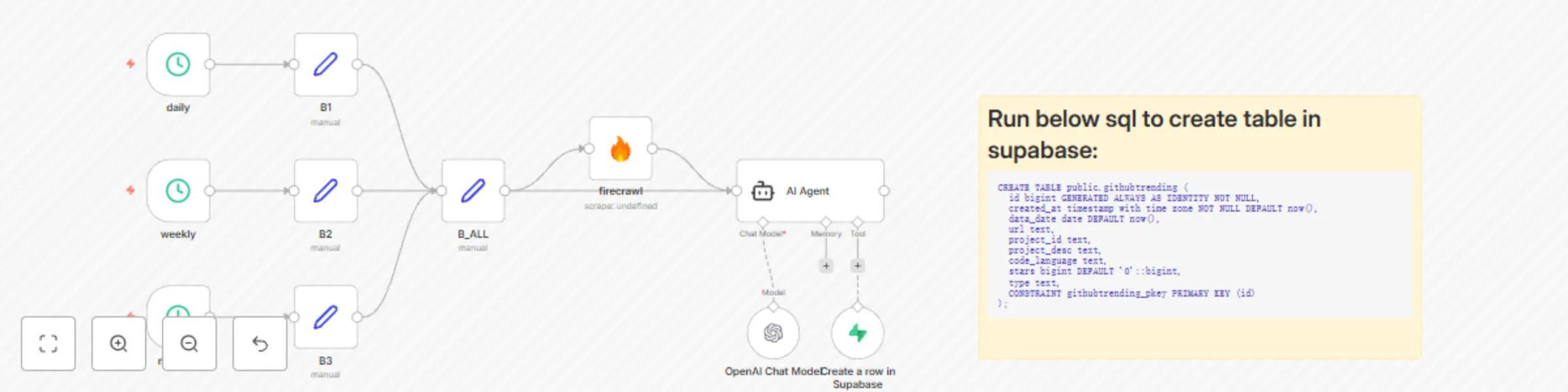
## GitHub Trending to Supabase (Daily, Weekly, Monthly) ## Who is this for? This workflow is for developers, researchers, founders, and data analysts who want a **historical dataset** of GitHub Trending repositories without manual scraping. It’s ideal for building dashboards, newsletters, or trend analytics on top of a clean Supabase table. ## What problem is this workflow solving? Checking GitHub Trending by hand (daily/weekly/monthly) is repetitive and error-prone. This workflow **automates collection, parsing, and storage** so you can reliably track changes over time and query them from Supabase. ## What this workflow does * Scrapes **GitHub Trending** across **Daily**, **Weekly**, and **Monthly** timeframes using **FireCrawl**. * Extracts per-project fields: `name`, `url`, `description`, `language`, `stars`. * Adds a `type` dimension (`daily` / `weekly` / `monthly`) to each row. * Inserts structured results into a **Supabase** table for long-term storage. ## Setup 1. Ensure you have an n8n instance (Cloud or self-hosted). 2. Create credentials: * **FireCrawl API** credential (no hardcoded keys in nodes). * **Supabase** credential (URL + Service Role / Insert-capable key). 3. Prepare a Supabase table (example): ```sql CREATE TABLE public.githubtrending ( id bigint GENERATED ALWAYS AS IDENTITY NOT NULL, created_at timestamp with time zone NOT NULL DEFAULT now(), data_date date DEFAULT now(), url text, project_id text, project_desc text, code_language text, stars bigint DEFAULT '0'::bigint, type text, CONSTRAINT githubtrending_pkey PRIMARY KEY (id) ); ``` 4. Import this workflow JSON into n8n. 5. Run once to validate, then schedule (e.g., daily at 08:00).

C
Cai Yongji
Engineering
15 Aug 2025
416
0