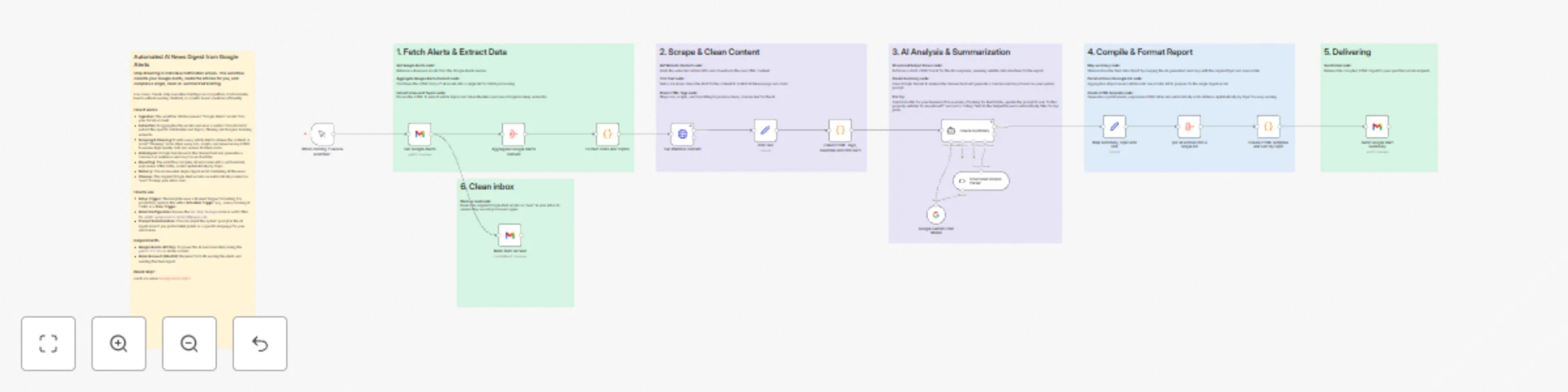
Create daily Google Alerts digest with Gemini AI summarization and Gmail
# Summarize Google Alerts with Gemini
Turn your noisy Google Alerts folder into a concise, AI-curated executive briefing. This workflow replaces dozens of individual notification emails with a single, structured daily digest.
### How it works
* **Ingest:** Fetches unread Google Alerts emails from your Gmail inbox.
* **Clean:** Extracts article links, scrapes the website content, and strips away ads and clutter to ensure high-quality AI processing.
* **Analyze:** Uses Google Gemini to summarize each article into a concise 2-4 sentence overview.
* **Deliver:** Compiles a professional HTML email report sorted by topic, sends it to you, and automatically marks the original alerts as read.
### Set up steps
* **Connect Gmail:** Authenticate your Gmail account to allow reading alerts and sending the digest.
* **Connect Gemini:** Add your Google Gemini API key.
* **Configure Recipient:** Update the **Send Email Digest** node with your desired destination email address.
* **Schedule:** (Optional) Replace the Manual Trigger with a **Schedule Trigger** (e.g., every morning at 7 AM) to fully automate the process.