B

Bastian Diaz

1
Workflow

Workflows by Bastian Diaz

Workflow preview: Generate educational social media carousels with GPT-4.1, Templated.io & Google Drive
Free advanced

Generate educational social media carousels with GPT-4.1, Templated.io & Google Drive

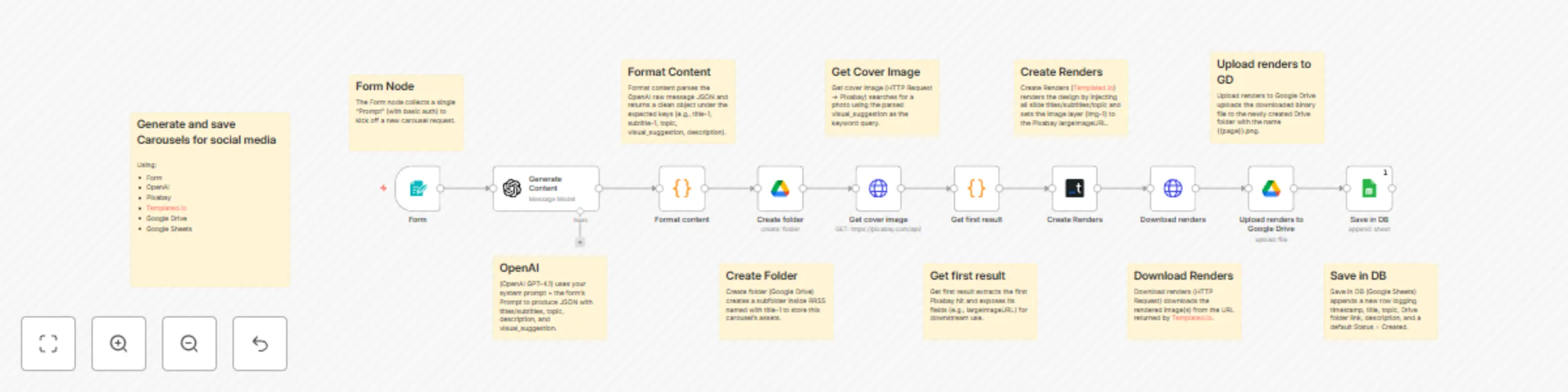
## 🎯 Description Automatically generates, designs, stores, and logs complete Instagram carousel posts. It transforms a simple text prompt into a full post with copy, visuals, rendered images, Google Drive storage, and a record in Google Sheets. ## ⚙️ Use case / What it does This workflow enables creators, educators, or community managers to instantly produce polished, on-brand carousel assets for social media. It integrates OpenAI GPT-4.1, Pixabay, Templated.io, Google Drive, and Google Sheets into one continuous content-production chain. ## 💡 How it works 1️⃣ Form Trigger – Collects the user prompt via a simple web form. 2️⃣ OpenAI GPT-4.1 – Generates structured carousel JSON: titles, subtitles, topic, description, and visual keywords. 3️⃣ Code (Format content) – Parses the JSON output for downstream use. 4️⃣ Google Drive (Create Folder) – Creates a subfolder for the new carousel inside “RRSS”. 5️⃣ HTTP Request (Pixabay) – Searches for a relevant image using GPT’s visual suggestion. 6️⃣ Code (Get first result) – Extracts the top Pixabay result and image URL. 7️⃣ Templated.io – Fills the design template layers (titles/subtitles/topic/image). 8️⃣ HTTP Request (Download renders) – Downloads the rendered PNGs from Templated.io. 9️⃣ Google Drive (Upload) – Uploads the rendered images into the created folder. 10️⃣ Google Sheets (Save in DB) – Logs metadata (title, topic, folder link, description, timestamp, status). ## 🔗 Connectors used - OpenAI GPT-4.1 (via n8n LangChain node) - Templated.io API (design rendering) - Pixabay API (stock image search) - Google Drive (storage + folder management) - Google Sheets (database / logging) - Form Trigger (input collection) ## 🧱 Input / Output Input: - User-submitted “Prompt” (text) via form Output: - Generated carousel images stored in Google Drive - Spreadsheet row in Google Sheets containing title, topic, description, Drive URL, status ## ⚠️ Requirements / Setup Valid credentials for: - OpenAI API (GPT-4.1 access) - Templated.io API key - Pixabay API key - Google Drive + Google Sheets OAuth connections - Existing Google Drive folder ID for RRSS storage - Spreadsheet with matching column headers (Created At, Title, Topic, Folder URL, Description, Status) - Published form URL for user prompts ## 🌍 Example applications / extensions - Educational themes (mental health, fitness, sustainability). - Extend to auto-publish to Instagram Business via Meta API. - Add Notion logging or automated email notifications. - Integrate scheduling (Cron node) to batch-generate weekly carousels.

B
Bastian Diaz
Content Creation
15 Oct 2025
402
0