Roni Bandini
Workflows by Roni Bandini
Smart shipping prioritization with Google Gemini and Google Sheets
**How it works** This template waits for an external button to be pressed via webhook, then reads a Google Sheet with pending shipments. The sheet contains the columns: idEnvio, fechaOrden, nombre, direccion, detalle, and enviado. It determines the next shipment using Google Gemini Flash 2.5, considering not only the date but also the customer’s comments. Once the next shipment is selected, the column “enviado” is updated with an X, and the shipping information is forwarded to Unihiker’s n8n Terminal. **Setup** Create a new Google Sheet and name it "Shipping". Add the following column headers in the first row: idEnvio, fechaOrden, nombre, direccion, detalle, and enviado. Connect your Google Sheets and Google Gemini credentials. In your n8n workflow, select the Shipping sheet in the Google Sheets node. Copy the webhook URL and paste it into the .ino code for your Unihiker n8n Terminal. 🚀
Multi-service terminal: Access Gmail, X, Telegram & news with Gemini AI
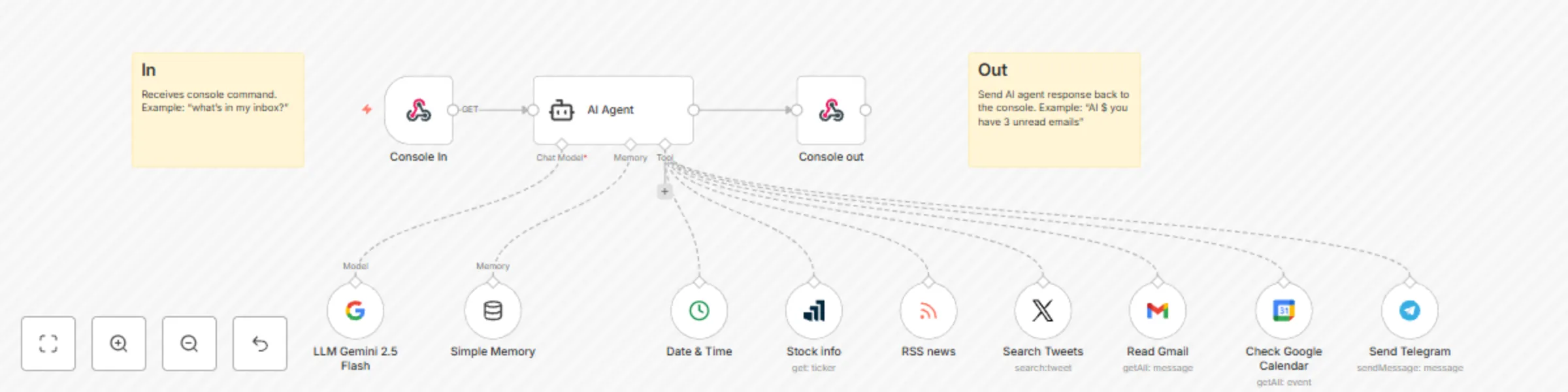
This workflow receives plain English instructions from a retro console via a webhook. Using an AI agent, it can combine multiple tools to read general RSS news headlines, stock market updates, emails, calendar events, search X, send Telegram messages, and run Linux commands. The idea is to avoid using smartphones or regular laptops in the morning, and instead use a retro console installed on an old notebook or netbook. You will need to copy a Python script onto the notebook, configure the webhook URL, and set up all the required credentials. Steps: 1. Setup Gemini API key, Google Gmail and Calendar credentials from console.google.com 2. Setup X credentials, RSS URL, etc 3. Obtain the webhook URL and paste into the Python code to be executed at the Linux machine 4. Run the python script with python3 console.py Note: if you ask for a Linux command, the command will not only be returned but also executed.