Automated BBB lead generation with BrowserAct
## **Automated BBB Lead Generation with BrowserAct**
---
### 🚀 Overview
This workflow automates **business data extraction**, **duplicate checking**, and **email outreach** using **BrowserAct**, **Google Sheets**, **Gmail**, and **Google Gemini AI** — all inside **n8n**.
It’s designed for marketers, lead generation specialists, or automation developers who want to build a **fully autonomous AI agent** that finds businesses online, filters duplicates, and automatically sends personalized outreach emails.
---
### 🧩 **Key Features**
* 🌐 **BrowserAct Integration** — Scrapes business data (name, phone, email, website, rating) from any target site.
* 🤖 **AI Data Extraction Agent** — Uses **Google Gemini AI** to clean, structure, and validate scraped data into standardized JSON.
* 📊 **Google Sheets Sync** —
* Reads all existing records
* Checks for duplicates
* Appends new rows automatically
* ✉️ **Automated Gmail Outreach** —
* Validates email addresses
* Sends outreach emails to valid leads
* Logs each status (e.g., `Successful`, `Duplicate`, `Pending - Invalid Email`)
* ⏳ **Smart Delay Control** — Uses Wait node to pause execution and respect email sending limits (max 2 emails per run).
---
### 🛠️ **Included Nodes**
| Node | Function |
| -------------------------- | ------------------------------------------------- |
| 🕓 **Schedule Trigger** | Runs the workflow automatically on schedule |
| 🌍 **BrowserAct** | Scrapes or extracts business data |
| ⚙️ **If Node** | Checks scraping results before processing |
| 🧠 **AI Agent (Gemini)** | Extracts structured business info |
| 💻 **Code (JavaScript)** | Cleans and parses AI output into usable JSON |
| 📩 **AI Agent 2 (Gemini)** | Handles decision-making for email + sheet updates |
| 📊 **Google Sheets Tools** | Reads, appends, and manages lead data |
| 📨 **Gmail Node** | Sends automated outreach emails |
| ⏱️ **Wait Node** | Adds delay to control workflow speed |
---
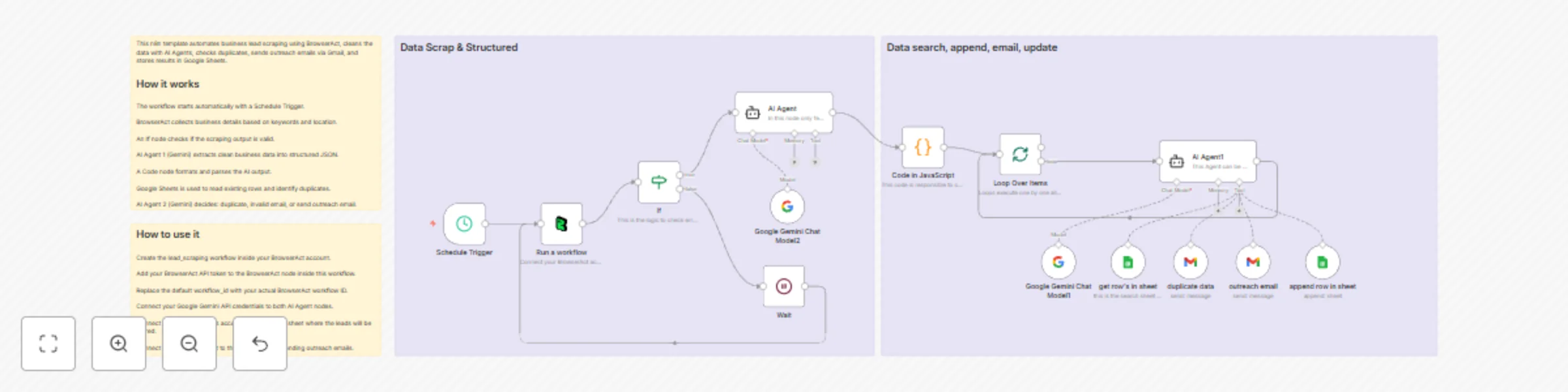
### 🧾 **How It Works**
1. **Schedule Trigger** starts the automation.
2. **BrowserAct** fetches business listings based on defined keywords and location.
3. **AI Agent (Gemini)** extracts business details (`business_name`, `website_url`, `phone_number`, `email_address`, `rating`).
4. **JavaScript Code Node** parses the AI’s JSON response.
5. **AI Agent 2 (Gemini)** decides:
* If duplicate → send message on your email address **Duplicate data found**
* If invalid email → marks as “Pending - Invalid Email”
* If valid email → sends via Gmail + updates Google Sheet
6. Final output returns structured statuses for each processed business.
---
### 🖼️ **Workflow Diagram**
> * Schedule Trigger
> * BrowserAct
> * AI Agent (Gemini)
> * JavaScript Code
> * Gmail & Google Sheets tools
![Workflow Preview]

---
### ⚙️ **Setup Instructions**
1. Connect your **BrowserAct**, **Google Sheets**, **Gmail**, and **Google Gemini API** credentials.
2. Define search **keywords** and **locations** inside the BrowserAct node.
3. Set your **Google Sheet ID** in the relevant nodes.
4. Customize the **Gmail message** if needed.
5. Activate the workflow and schedule it.
---
### 📤 **Output Example**
```json
[
{
"business_name": "ABC Restaurant",
"email_sent": "Successful"
},
{
"business_name": "XYZ Foods",
"email_sent": "Duplicate - Already Exist"
},
{
"business_name": "Fresh Eats",
"email_sent": "Pending - Invalid Email"
}
]
```
---
### 👨💻 **Created by**
**Bakir Ali**
Automation & AI Workflow Creator — specialized in BrowserAct, Google AI (Gemini), and n8n-based automation systems.