A

andsync

1
Workflow

Workflows by andsync

Workflow preview: Summarize YouTube videos with AI and extract key lessons to Google Docs
Free intermediate

Summarize YouTube videos with AI and extract key lessons to Google Docs

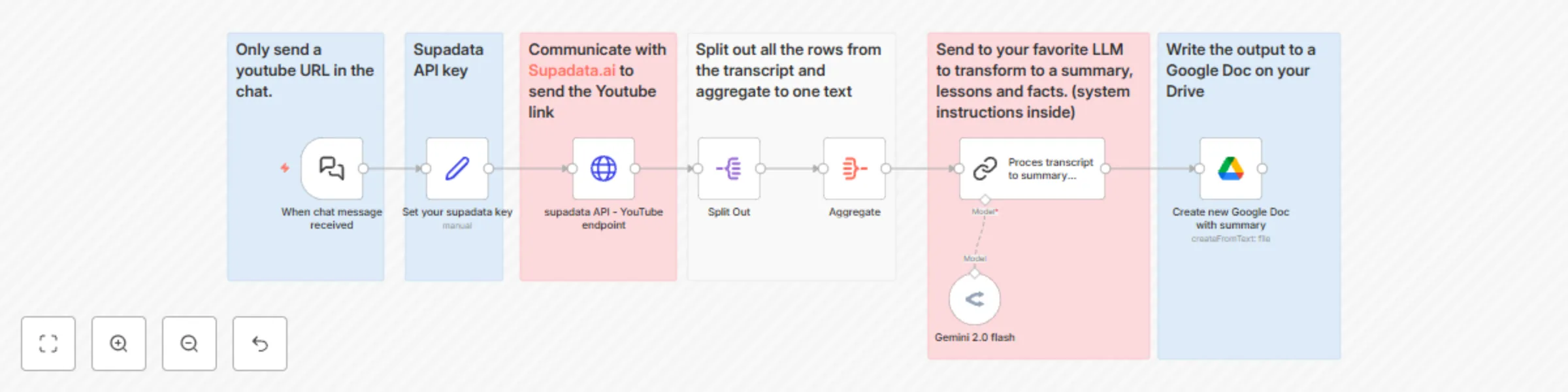
## Who is this template for? This template is for learners, researchers, students and professionals who want to quickly capture the essence of a YouTube video. Steps in the workflow: - Gets the transcript from any YouTube video through Supadata. - Process the result from Supadata to one text - Process the text with AI (any LLM of your choice) Final result: Produces a summary accompanied with the most important lessons and interesting facts mentioned in the video. The workflow automatically creates a new Google Doc wiht this output, in a folder of your choice on your Google Drive. _(If you want to convert the markdown text to real markup after the Google Doc is created: just select all text (Ctrl-A or CMD-A), Cut the text (Ctrl-X or CMD-X and then go to Edit > Paste from Markdown.)_ ## Setup - Edit your Supadata credentials in the second node (you can start for free) - Choose your favourite LLM for AI processing - Edit your Google Drive credentials. ## How to adjust it to your needs - If you want the outcome to be different, edit the Prompt in "Proces transcript to summary template". - The file name is a combination of ‘transcript ‘ and the date and time. You can change this to whatever you need in the Google Drive node. - Supadata offers more details and options (or even translation) when working with transcripts. Check the options here: https://supadata.ai/documentation/youtube/get-transcript

a
andsync
Document Extraction
20 Jun 2025
1093
0