Aziz B
Workflows by Aziz B
AI-Powered Dental Appointment System with Telegram, Google Calendar and Sheets
## Overview - This workflow is an **AI-powered Dental Appointment Assistant** that automates appointment booking, rescheduling, and cancellations through **Telegram** or a **Webhook**. - It uses intelligent agents to understand user intent, gather details, manage Google Calendar events, update records in Google Sheets, and send confirmation emails — creating a **fully automated and customizable booking system** suitable for **any business**, not just dental clinics. --- ## How It Works ### 1. User Interaction - The workflow can be triggered via **Telegram**, **Webhook**, and can easily be extended to **WhatsApp** or **Facebook Messenger**. - The **Planning Agent** starts the conversation and collects essential details like: - Appointment type (book, update, or delete) - Date and time preference - Service type or reason for visit - Personal details (name, email, etc.) - Based on the user’s intent, it routes the conversation to the appropriate booking flow. ### 2. Booking Flow - The **Booking Agent** handles the actual scheduling logic. - It interacts with **Google Calendar** to: - **Create new events** for fresh appointments - **Update existing events** for reschedules - **Delete events** for cancellations - It ensures proper validation (availability, overlaps, etc.) before confirming any calendar changes. ### 3. Post-Booking Actions - Once the booking action is completed: - The **Mail and Sheet Entry Agent** updates the **Google Sheet** with user details such as: - Name - Email - Appointment date & time - Status (booked/updated/cancelled) - Short description of the appointment - Sends an **email confirmation** to the user (for all actions — create, update, or delete). - Sends a **final message** via Telegram (or chosen platform) confirming the status of the appointment. --- ## How to Use - Trigger the workflow via **Telegram** or a **Webhook URL**. - The AI assistant will guide the user step-by-step through booking, updating, or cancelling an appointment. - Once confirmed, the system: - Updates Google Calendar automatically - Logs the appointment details in Google Sheets - Sends an email and chat confirmation message to the user --- ## Requirements To deploy this workflow, you’ll need: - **n8n account** (self-hosted or cloud) - **Telegram Bot Token**, or other chat integrations (WhatsApp / Facebook) - **OpenAI or OpenRouter API Key** (for AI conversation agents) - **Google Calendar API access** (to manage events) - **Google Sheets API access** (to store booking records) - **Gmail / SMTP credentials** (to send confirmation emails)
AI-powered salon booking with GPT, Google Calendar & email confirmations
## Overview - This workflow is an **AI-powered Salon Booking Assistant** that automates hair, beauty, and spa appointment scheduling through a **Webhook trigger**. - It interacts with the user in natural conversation, collects booking details (service type, stylist preference, date/time, and any special requests), finalizes the draft, and confirms the appointment by storing it in **Google Calendar** and sending an **email confirmation** — fully automated end-to-end. --- ## How It Works ### 1. User Interaction - The workflow starts when a user submits a request via the **Webhook**. - The AI agent asks step-by-step questions: - Type of service (haircut, facial, manicure, etc.) - Preferred stylist (optional) - Preferred date & time - Any additional notes (special treatments, products, etc.) - Once details are gathered, it generates a draft appointment summary. ### 2. Confirmation & Personal Details - The user reviews the draft and confirms. - The assistant then asks for personal details (name, email, phone number). ### 3. Booking & Notifications - After confirmation, the details are sent to **Google Calendar** to create an appointment. - A **confirmation email** is sent to the user with all booking information. - A final webhook response confirms that the appointment is successfully booked. --- ## How to Use - Triggered directly via a **Webhook URL** (can be embedded in your salon website or mobile app). - Simply fill in the details, and the assistant will guide the user step by step until the booking is finalized. - Once completed, the user receives both an **email confirmation** and an on-screen success message. --- ## Requirements To use this workflow, you’ll need: - **n8n account** (self-hosted or cloud) - **Webhook node** (for booking trigger) - **OpenAI or OpenRouter API Key** (for AI-driven conversation) - **Google Calendar API access** (to create appointments) - **Gmail / SMTP credentials** (to send confirmation emails)
AI-powered restaurant booking system with Telegram, Calendar & Email notifications
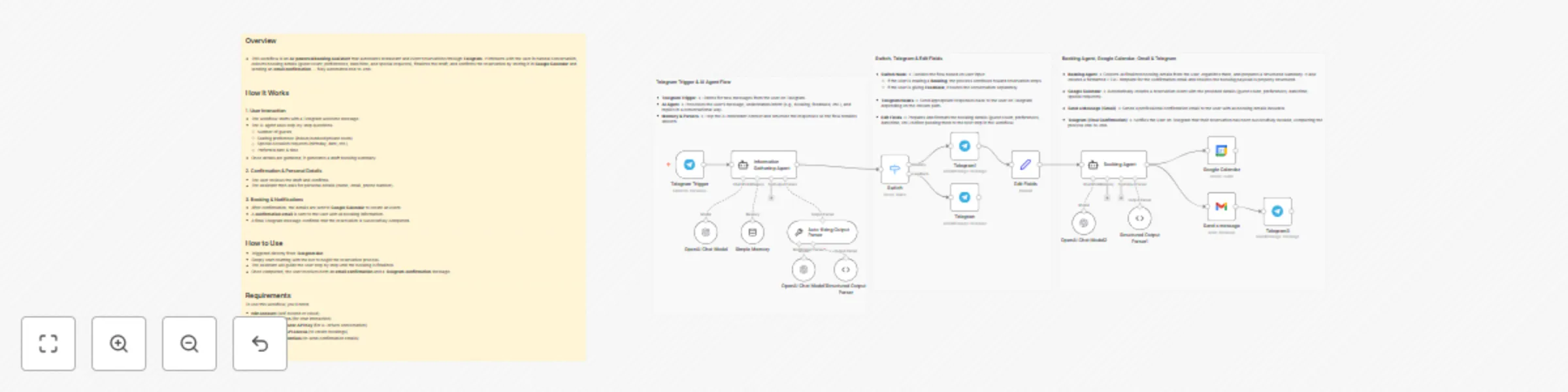
## Overview This workflow is an AI-powered Booking Assistant that automates restaurant and event reservations through Telegram. It interacts with the user in natural conversation, collects booking details (guest count, preferences, date/time, and special requests), finalizes the draft, and confirms the reservation by storing it in Google Calendar and sending an email confirmation — fully automated end-to-end. --- ## How It Works ### 1. User Interaction - The workflow starts with a Telegram welcome message. - The AI agent asks step-by-step questions: - Number of guests - Seating preference (indoor/outdoor/private room) - Special occasion requests (birthday, date, etc.) - Preferred date & time - Once details are gathered, it generates a draft booking summary. ### 2. Confirmation & Personal Details - The user reviews the draft and confirms. - The assistant then asks for personal details (name, email, phone number). ### 3. Booking & Notifications - After confirmation, the details are sent to Google Calendar to create an event. - A confirmation email is sent to the user with all booking information. - A final Telegram message confirms that the reservation is successfully completed. --- ## How to Use - Triggered directly from Telegram Bot. - Simply start chatting with the bot to begin the reservation process. - The assistant will guide the user step by step until the booking is finalized. - Once completed, the user receives both an email confirmation and a Telegram confirmation message. --- ## Requirements To use this workflow, you’ll need: - n8n account (self-hosted or cloud) - Telegram Bot Token (for chat interaction) - OpenAI or OpenRouter API Key (for AI-driven conversation) - Google Calendar API access (to create bookings) - Gmail / SMTP credentials (to send confirmation emails)
Deep research agent - automated research & Notion report builder
### Overview - This workflow acts as an AI-powered research assistant that takes a topic from the user, performs multi-step intelligent research, and stores the final report in Notion. It uses advanced search, content extraction, and AI summarization to deliver a high-quality research report—fully automated from query to publication. --- ### How It Works - **User Interaction** - The workflow starts by asking the user what topic they want to research. - A “Strategy Agent” asks 2–3 clarifying questions to refine the scope. - Once the user confirms, it creates a **Notion database page** with the research title. - **Search Query Generation** - Generates up to **3 relevant search queries** for the given topic. - **Data Gathering** (Loop over each query) - Sends the query to **Tavily Search API** to find the most relevant blogs/articles. - Picks the top-matched link and uses Tavily again to extract its content. - Repeats the process for all 3 queries. - **Report Compilation** - Aggregates extracted content from all sources. - A **Final Report Agent** creates a well-structured research report in **Markdown**. - Converts Markdown → HTML → splits into chunks. - Pushes each chunk into the Notion report page. - **Delivery** - Sends the **final Notion report link** back to the user. --- ### How to Use - This workflow is triggered via **Webhook**. - **Attach the provided webhook URL** to any application, form, or chatbot to collect the user’s topic. - Once triggered, the workflow will run automatically and deliver the research link without any manual steps. --- ### Requirements To use this workflow, you’ll need: - **n8n account** (self-hosted or cloud) - **Notion account** with a database where reports will be stored - **Tavily API Key** – for search & content extraction - **OpenRouter API key** *or* **OpenAI API key** – for AI agents & report generation - **Google Gemini API Key** – for converting Markdown to HTML and splitting content for Notion - Notion database ID connected in n8n