A

Asfandyar Malik

5
Workflows

Workflows by Asfandyar Malik

Workflow preview: Automate CV screening and candidate scoring with Gemini AI and Google Sheets
Free advanced

Automate CV screening and candidate scoring with Gemini AI and Google Sheets

![Screenshot 20251030 174902.png](fileId:3149) ## Who’s it for For HR professionals, recruiters, and hiring managers who want to automate the initial CV screening and candidate evaluation process. This workflow helps teams efficiently assess applicants based on submitted answers and resume data — saving hours of manual review and ensuring fair, consistent scoring. ## How it works This workflow automates CV screening using Google Drive, Google Sheets, and Gemini AI. When a candidate submits a form with their answers and CV, the file is uploaded to Drive, converted from PDF to plain text, and merged with the form data. Gemini AI then analyzes both inputs, comparing skills, experience, and responses to generate consistency, job-fit, and final scores. Finally, the results are parsed, saved to Google Sheets, and automatically sorted by score, providing a ranked list of candidates for easy review. ## How to set up 1. Connect your Google Drive and Google Sheets credentials in n8n. 2. Configure your Form Trigger to capture candidate answers and CV uploads. 3. Set up the Extract from File node to parse PDF files into text. 4. Add your Gemini AI credentials securely using n8n’s credential system (no hardcoded keys). 5. Execute the workflow once to verify that CVs are uploaded, analyzed, and ranked in the connected Google Sheet. ## Requirements 1. n8n account (cloud or self-hosted). 2. Google Drive and Google Sheets integrations. 3. Gemini AI (Chat Model) API credentials. 4. A connected form (e.g., Typeform, n8n Form Trigger) ## How to customize You can modify the AI prompt to align with your company’s job criteria or evaluation style. Add more scoring categories (e.g., education, technical skills, experience). Change the output destination — send results to Airtable, Notion, or Slack. Enhance it with dashboards or extra nodes for reporting and analytics. ## ⚠️ Disclaimer This workflow uses Gemini AI, which may require self-hosting for community node compatibility. Ensure that no personal or sensitive candidate data is shared externally when using AI services.

A
Asfandyar Malik
HR
31 Oct 2025
371
0

Workflow preview: Track freelance jobs from Apify and get instant WhatsApp alerts for new leads
Free intermediate

Track freelance jobs from Apify and get instant WhatsApp alerts for new leads

![Screenshot 20251024 210656.png](fileId:3107) Automatically track new freelance job postings from any platform using **Apify Actors**, process the results, and get **real-time WhatsApp alerts** for new opportunities. This workflow saves jobs to Google Sheets for record-keeping and sends instant notifications so you never miss a client lead. --- ## Who’s it for Freelancers, agencies, and business developers who want to monitor platforms like **Upwork, Fiverr, or Freelancer** for new jobs — without checking manually. --- ## How it works 1. The workflow starts when a **chat message** or trigger event is received. 2. It runs an **Apify Actor** to scrape job listings from your target platform. 3. The **dataset results** are fetched via Apify’s API. 4. A **JavaScript Code node** processes and filters the results for relevant jobs. 5. The data is saved to **Google Sheets** for tracking and reporting. 6. A formatted job summary is created and sent as a **WhatsApp message** directly to your phone. --- ## How to set up 1. Create or use an **Apify Actor** for scraping job listings from your chosen site. 2. Connect your **Apify API token** in n8n under credentials. 3. Link your **Google Sheets** account and specify the sheet for storing job data. 4. Add your **WhatsApp Cloud API** or **Twilio WhatsApp** credentials. 5. Test the workflow by sending a trigger message — new jobs will be fetched, stored, and sent to WhatsApp. --- ## Requirements - Apify account with API access - Google Sheets integration - WhatsApp Cloud API or Twilio account - n8n Cloud or self-hosted instance --- ## How to customize - 🧩 **Add filters:** Include keyword or budget filters in the JavaScript node. - 🔄 **Schedule runs:** Replace the chat trigger with a **Cron node** for hourly or daily tracking. - 📊 **Change destination:** Save results to Notion, Airtable, or Slack instead of Google Sheets. - 🗣️ **Multi-channel alerts:** Send updates to Discord, Telegram, or Email as well. --- **Stay ahead of freelance opportunities — this n8n workflow finds jobs, logs them, and alerts you instantly via WhatsApp.**

A
Asfandyar Malik
Personal Productivity
20 Oct 2025
104
0

Workflow preview: Auto-generate & polish professional bios with GPT-5 and Google Docs
Free advanced

Auto-generate & polish professional bios with GPT-5 and Google Docs

![Screenshot 20251024 210852.png](fileId:3106) Automatically create, evaluate, and optimize professional biographies with the Bio-Graphy Agent. This workflow uses a multi-agent system powered by GPT-5 to write, review, and enhance bios — then saves the final version directly to Google Docs. --- ## Who’s it for For professionals, creators, and marketers who want high-quality biographies for their profiles, portfolios, or LinkedIn — without spending hours writing or editing. --- ## How it works 1. The user sends a chat message with details like **name**, **age**, and **location**. 2. The **Biography Agent** generates a complete biography using the GPT-5 Chat Model. 3. The **Evaluator Agent** reviews the bio and provides structured feedback. 4. The **Optimizer Agent** refines tone, structure, and clarity based on that feedback. 5. The final biography is saved automatically to **Google Docs** for easy access or publishing. --- ## How to set up 1. Connect your **Google account** in n8n to enable document saving. 2. Add your **OpenAI (GPT-5 or compatible)** credentials to the agent nodes. 3. Customize prompts in the Biography, Evaluator, and Optimizer agents for your preferred writing style. 4. Test the workflow by sending a chat message with basic personal details. 5. Your completed bio will be generated, improved, and saved to your connected Google Docs. --- ## Requirements - n8n Cloud or Self-hosted instance - Google Docs integration - OpenAI (GPT-compatible) credentials --- ## How to customize - 🎯 **Add personality:** Adjust the prompts to make bios sound more friendly, formal, or humorous. - 🌐 **Change output:** Send the result to Notion, Airtable, or Gmail instead of Google Docs. - 🪄 **Add another agent:** Include a Grammar or Tone Correction agent for extra polish. - 🧩 **Extend use:** Adapt it for “About Us” pages, resumes, or brand storytelling. --- **Use this workflow to instantly generate professional, polished bios — powered by GPT-5 and automated through n8n.**

A
Asfandyar Malik
Content Creation
20 Oct 2025
53
0
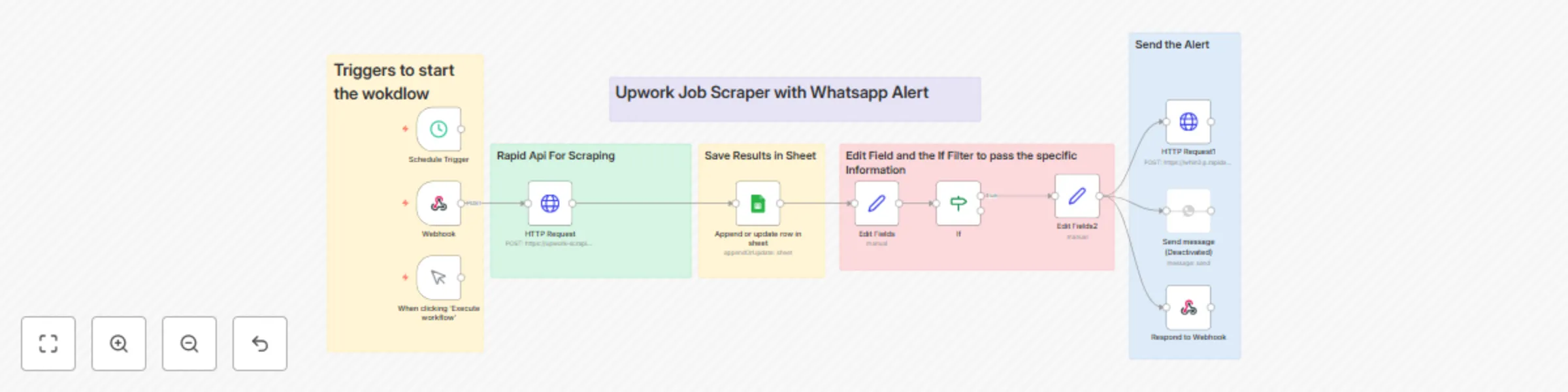
Workflow preview: Track and receive Upwork job alerts via WhatsApp and Google Sheets
Free advanced

Track and receive Upwork job alerts via WhatsApp and Google Sheets

![Screenshot 20251015 184902.png](fileId:2958) ## Short Description Automatically scrape new Upwork job listings, save them to Google Sheets, and get real-time WhatsApp alerts when new matching jobs appear. This workflow helps freelancers and agencies track new opportunities instantly — without checking Upwork manually. --- ## Who’s it for For freelancers, agencies, and automation enthusiasts who want to monitor Upwork jobs automatically and receive instant notifications for relevant projects. ## How it works This workflow connects with RapidAPI to fetch new Upwork job listings, filters relevant ones, stores them in a Google Sheet, and sends WhatsApp alerts for matching results. It includes: - **Trigger node** for scheduled or webhook-based execution - **HTTP Request node** connected to RapidAPI for scraping - **Google Sheets node** to store job data - **Filter (IF) node** to select relevant jobs - **WhatsApp API node** to send alerts automatically ## How to set up 1. Get an API key from [RapidAPI](https://rapidapi.com) and subscribe to an Upwork scraper API. 2. Create a Google Sheet with columns like *Title, Budget, Category, Link, and Description*. 3. Connect your Google account to n8n using **Google Sheets credentials**. 4. Set up your **WhatsApp API endpoint** (e.g., via Waha API or WhatsApp Cloud API). 5. Paste your API keys into the HTTP Request nodes and test the workflow. 6. Schedule the workflow to run automatically (e.g., every hour or once daily). ## Requirements - RapidAPI account (for Upwork scraper API) - Google Sheets account - WhatsApp API access (Waha / Cloud API) - n8n cloud or self-hosted instance ## How to customize You can modify this workflow to: - Track specific job categories or keywords (e.g., “automation”, “AI”, “n8n”) - Send alerts to Telegram, Discord, or Slack instead of WhatsApp - Add budget or client rating filters for higher-quality job leads - Connect it with Airtable or Notion for advanced job tracking

A
Asfandyar Malik
Lead Generation
15 Oct 2025
208
0
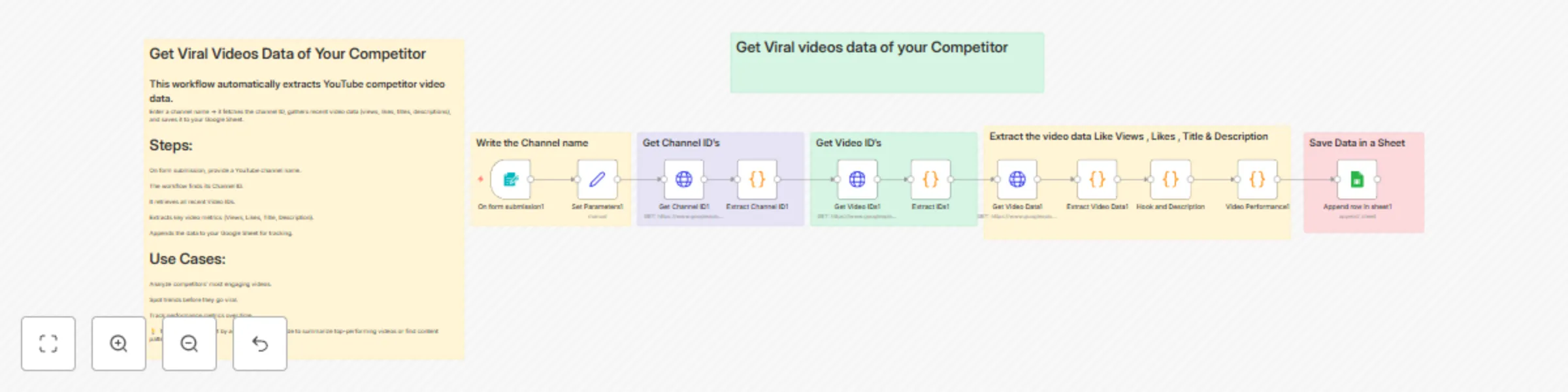
Workflow preview: YouTube competitor video analytics to Google Sheets
Free advanced

YouTube competitor video analytics to Google Sheets

![Screenshot 20251014 191255.png](fileId:2945) ## Short Description: Automatically collect and analyze your competitor’s YouTube performance. This workflow extracts video titles, views, likes, and descriptions from any YouTube channel and saves the data to Google Sheets — helping creators spot viral trends and plan content that performs. ## Who’s it for For content creators, YouTubers, and marketing teams who want to track what’s working for their competitors — without manually checking their channels every day. ## How it works This workflow automatically collects data from any YouTube channel you enter. You just write the channel name in the form — n8n fetches the channel ID, gets all recent video IDs, and extracts each video’s title, views, likes, and description. Finally, all the information is saved neatly into a connected Google Sheet for analysis. ## How to set up 1. Create a Google Sheet with columns for Title, Views, Likes, Description, and URL. 2. Connect your Google account to n8n. 3. Add your YouTube Data API key inside the HTTP Request nodes (use n8n credentials, not hardcoded keys). 4. Update your form submission or trigger node to match your input method. 5. Execute the workflow once to test and verify that data is flowing into your sheet. ## Requirements - YouTube Data API key - Google Sheets account - n8n cloud or self-hosted instance ## How to customize You can modify the JavaScript code node to include more metrics (like comments or publish date), filter by keywords, or change the output destination (e.g., Airtable or Notion).

A
Asfandyar Malik
Market Research
14 Oct 2025
247
0