A

Apurva Mishra

1
Workflow

Workflows by Apurva Mishra

Workflow preview: Automated email management with Gemini AI: Gmail summarizing, labeling and Notion/Sheets logging
Free advanced

Automated email management with Gemini AI: Gmail summarizing, labeling and Notion/Sheets logging

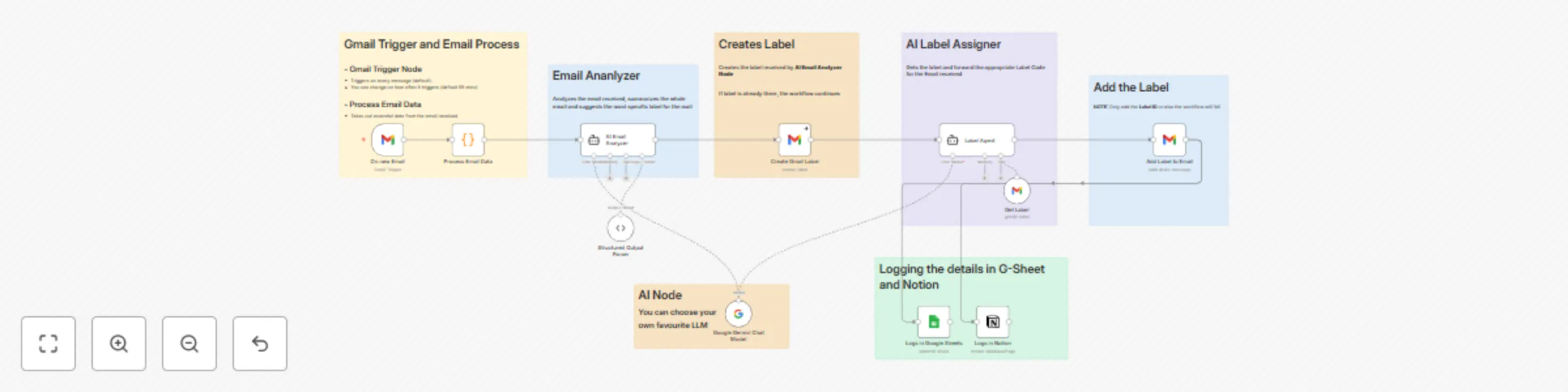
### AI Email Manager: Auto Summary, Labeling, and CRM Logging via n8n + Gemini ### Overview This workflow turns your Gmail inbox into a fully autonomous AI Email Agent that reads, summarizes, categorizes, and organizes emails in real-time. Built with n8n, Google Gemini, Notion, and Google Sheets, it’s perfect for founders, freelancers, and agencies who receive a ton of emails daily and want to automate the triage process without losing control. ##### How It Works 1. Gmail Trigger — Detects new incoming emails. 2. Process Email Data — Extracts sender info, subject, and content in a clean structured format. 3. AI Email Analyzer — Uses Gemini AI to summarize the email and decide the most relevant label (e.g., Project Updates, Client Requests, Invoices, etc.). 4. Create Gmail Label (if not exists) — Dynamically creates a new label if the AI recommends one that doesn’t exist. 5. AI Agent + Add Label to Email — Applies the correct Gmail label automatically using the message ID. 6. Logs in Notion & Google Sheets — Every processed email (summary, sender, date, label) is logged for tracking and analytics. Who It’s For - Entrepreneurs & Founders — Manage investor, client, and product update emails automatically. - Agencies & Teams — Classify and track client emails effortlessly across projects. - Freelancers & Consultants — Get AI summaries and organize leads without manually labeling emails. - Tech Builders — Anyone building AI automation tools and SaaS products around inbox management.

A
Apurva Mishra
Ticket Management
15 Oct 2025
579
0