A

Alvin Chandra

1
Workflow

Workflows by Alvin Chandra

Workflow preview: Transform product photos into ad campaigns with Gemini Vision and Claude via Telegram
Free advanced

Transform product photos into ad campaigns with Gemini Vision and Claude via Telegram

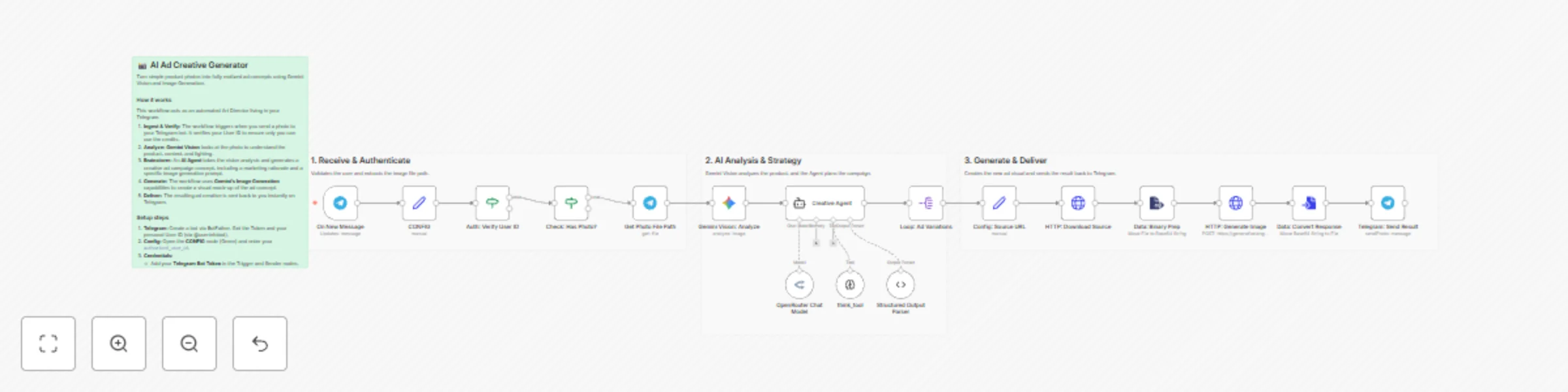
# AI Creative Director: Transform Phone Photos into Viral Ad Campaigns ## Description Turn amateur product snapshots into high-conversion advertising assets automatically. This agentic workflow acts as your personal Art Director. Simply send a photo to a Telegram bot, and the AI will analyze the image, conceptualize 3 distinct marketing angles, and generate professional-grade commercial photography. ## How it Works 1. **Ingest:** Receives a photo and user caption via Telegram. 2. **Analyze:** Uses **Gemini Vision** to understand the product and critique the original image quality. 3. **Ideate:** A **LangChain Agent** (powered by Claude Sonnet via OpenRouter) acts as a Creative Director to brainstorm 3 unique ad concepts (e.g., Cyberpunk, Luxury, Minimalist). 4. **Create:** Generates high-fidelity images using the **Gemini 3 Pro** API. 5. **Deliver:** Sends the new ad creatives back to you on Telegram. ## Key Features * **Multi-Modal Pipeline:** Chains Vision models (Gemini) with Reasoning models (Claude) for superior context awareness. * **Structured Output:** Uses LangChain's Structured Output Parser to ensure consistent JSON formats. * **Secure Configuration:** Features a centralized `CONFIG` node to easily manage API keys and user IDs without editing complex logic. * **Visual Verification:** Includes an authentication check to ensure only *you* (the authorized user) can trigger the bot. ## Prerequisites * **n8n Version:** 1.0+ (requires LangChain nodes). * **Telegram:** A Bot Token and your personal User ID. * **Google Cloud:** An API Key with access to Gemini models. * **OpenRouter:** An API Key for accessing Claude Sonnet (or your preferred LLM). ## Setup Instructions 1. **Import the Workflow:** Paste the JSON into your n8n canvas. 2. **Open the `CONFIG` Node:** Locate the green node at the start of the workflow. 3. **Enter Credentials:** * `authorized_user_id`: Your numeric Telegram User ID (to prevent strangers from using your API credits). * `telegram_bot_token`: Your Bot Father token. * `google_api_key`: Your Gemini API key. 4. **Activate:** Toggle the workflow to "Active" and send a photo to your bot! ## Tags #AI #LangChain #Gemini #Telegram #Marketing #Agent #ImageGeneration #OpenRouter

A
Alvin Chandra
Content Creation
24 Nov 2025
107
0