Ali Khosravani
Workflows by Ali Khosravani
Automate WordPress & WooCommerce content with OpenAI: Reviews, comments & updates
This workflow automates reviews, comments, and content enhancements for WordPress and WooCommerce using AI. It includes five independent paths that you can run manually or schedule automatically. ## Features ### 1. Product AI Comment Generator Automatically generates short, natural product reviews using AI and posts them to WooCommerce products. Fetches product data via REST API Builds an AI prompt with product info Posts generated review to WooCommerce ### 2. Article AI Comment Generator Generates engaging, relevant comments for WordPress blog posts. Fetches published articles Builds AI prompt from post content Submits generated comment to WordPress ### 3. Article Content Enhancer with AI Summary Enhances articles with AI-generated headings & summary conclusions. Fetches article content Cleans HTML → plain text for AI prompt Updates article with enhanced content ### 4. Product Category Content Enhancer Improves WooCommerce product categories by adding AI-powered headings & summaries. Fetches category details Cleans description text Generates new engaging section with AI Updates category in WooCommerce ### 5. Product Content Enhancer Optimizes WooCommerce product pages with AI-written descriptions. Fetches products (description + short description) Cleans & prepares text for AI Generates new SEO-friendly text Updates product in WooCommerce ## How to Use 1. Import this workflow into n8n. 2. Configure your credentials: 3. httpBasicAuth → WordPress/WooCommerce API credentials 4. openAiApi → OpenAI API Key 5. Replace all instances of example.com with your site’s domain. 6. Run manually via Execute Workflow or enable Schedule Trigger for automation. ## Requirements WordPress site with REST API enabled WooCommerce installed & active Valid API keys: WooCommerce Consumer Key & Secret OpenAI API key ### Notes Multiple output methods are included (HTTP Request or WordPress Node). Use whichever works better for your setup. AI prompts are customizable — adjust style, tone, or keywords for your niche. This template is modular: You can use only the paths you need. > 📖 Tip: Test each path separately first (e.g., only comments, only product content update) before enabling them all together.
Add AI-generated headings & conclusions to WordPress posts with GPT-4.1
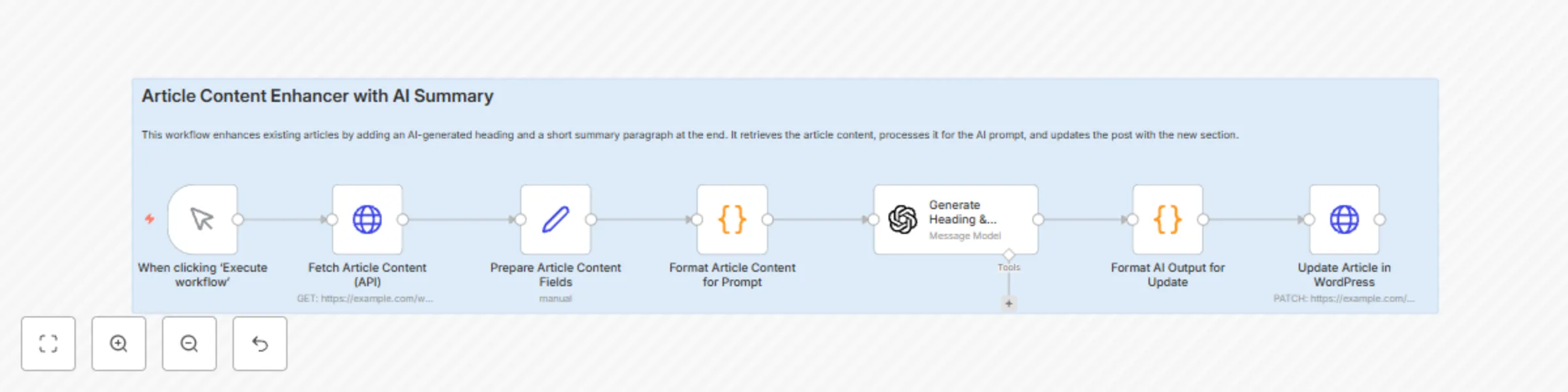
This workflow enriches your WordPress articles by automatically adding an AI-generated heading and a short concluding paragraph. It ensures each post ends with valuable, engaging content to improve user satisfaction, branding, and SEO. ## How It Works Fetches published articles from your WordPress site via the REST API. Cleans and formats the article text for processing. Sends the content to OpenAI with a structured prompt. AI generates a new heading + 3-line conclusion tailored to the article. Appends the generated text to the original content. Updates the article back in WordPress automatically. ### Requirements 1. n8n version: 1.49.0 or later (recommended). 3. Active OpenAI API key. 5. WordPress REST API enabled. 7. WordPress API credentials (username + application password). ### Setup Instructions Import this workflow into n8n. Go to Credentials and configure: OpenAI API (API key). WordPress API (username + application password). Replace https://example.com with your site’s URL. Run manually or schedule it to enhance content automatically. ### Categories AI & Machine Learning WordPress Content Marketing SEO #### Tags ai, openai, wordpress, seo, content enhancement, automation, n8n
Automate blog engagement with GPT-5 generated comments for WordPress
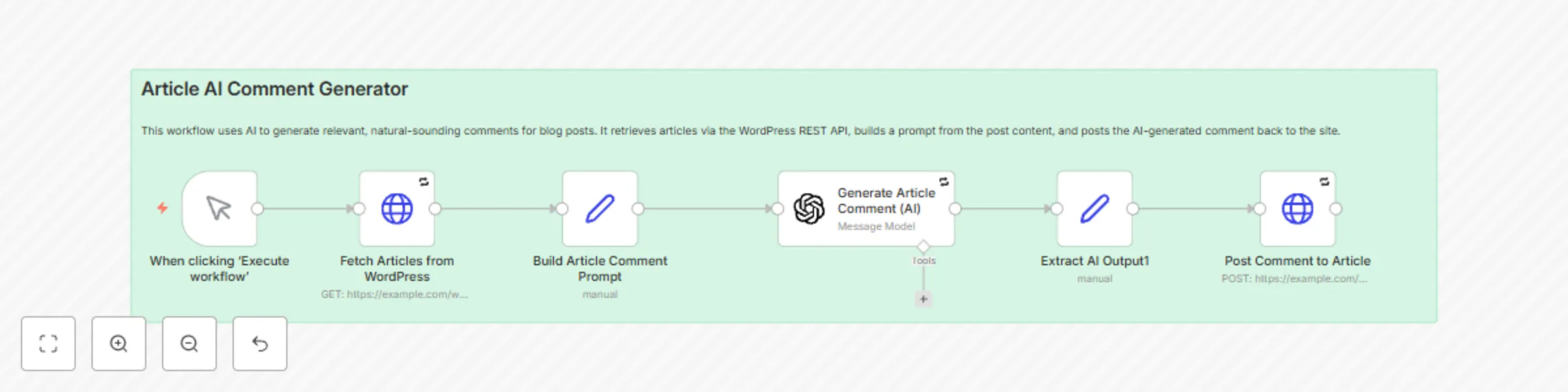
This workflow automatically generates realistic comments for your WordPress articles using AI. It makes your blog look more active, improves engagement, and can even support SEO by adding keyword-relevant comments. ## How It Works Fetches all published blog posts from your WordPress site via the REST API. Builds a tailored AI prompt using the article’s title, excerpt, and content. Uses OpenAI to generate a short, natural-sounding comment (some positive, some neutral, some longer, some shorter). Assigns a random commenter name and email. Posts the generated comment back to WordPress. ### Requirements 1. n8n version: 1.49.0 or later (recommended). 3. Active OpenAI API key. 5. WordPress site with REST API enabled. 7. WordPress API credentials (username + application password). ## Setup Instructions Import this workflow into n8n. Add your credentials in n8n > Credentials: OpenAI API (API key). WordPress API (username + application password). Replace the sample URL https://example.com with your own WordPress site URL. Execute manually or schedule it to run periodically. ### Categories AI & Machine Learning WordPress Content Marketing Engagement #### Tags ai, openai, wordpress, comments, automation, engagement, n8n
Generate authentic product reviews with OpenAI for WooCommerce
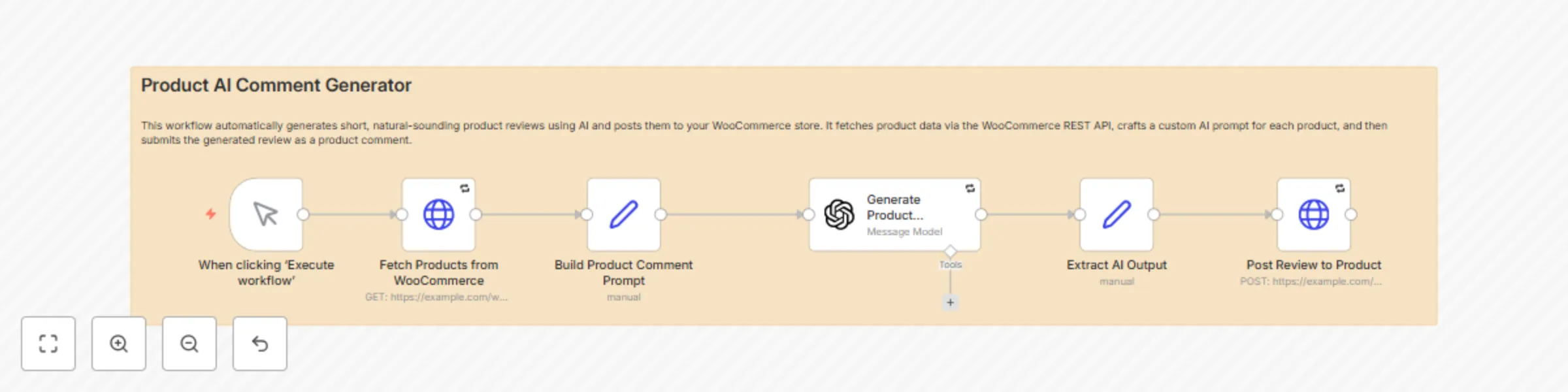
This workflow automatically generates natural product comments using AI and posts them to your WooCommerce store. It helps boost engagement and makes product pages look more active and authentic. ## How It Works Fetches all products from your WooCommerce store. Builds an AI prompt based on each product’s name and description. Uses OpenAI to generate a short, human-like comment (neutral, positive, negative, or questioning). Assigns a random reviewer name and email. Posts the comment back to WooCommerce as a product review. ### Requirements 1. n8n version: 1.49.0 or later (recommended). 2. Active OpenAI API key. 3. WooCommerce installed and REST API enabled. 4. WordPress API credentials (Consumer Key & Consumer Secret). ### Setup Instructions Import this workflow into n8n. Add your credentials in n8n > Credentials: OpenAI API (API key). WooCommerce API (consumer key & secret). Replace the sample URL https://example.com with your own WordPress/WooCommerce site URL. Execute manually or schedule it to run periodically. ### Categories AI & Machine Learning WooCommerce WordPress Marketing Engagement #### Tags ai, openai, woocommerce, comments, automation, reviews, n8n > Note: AI-generated comments should be reviewed periodically to ensure they align with your store’s policies and brand voice.