M

Muhammad Ali

4
Workflows

Workflows by Muhammad Ali
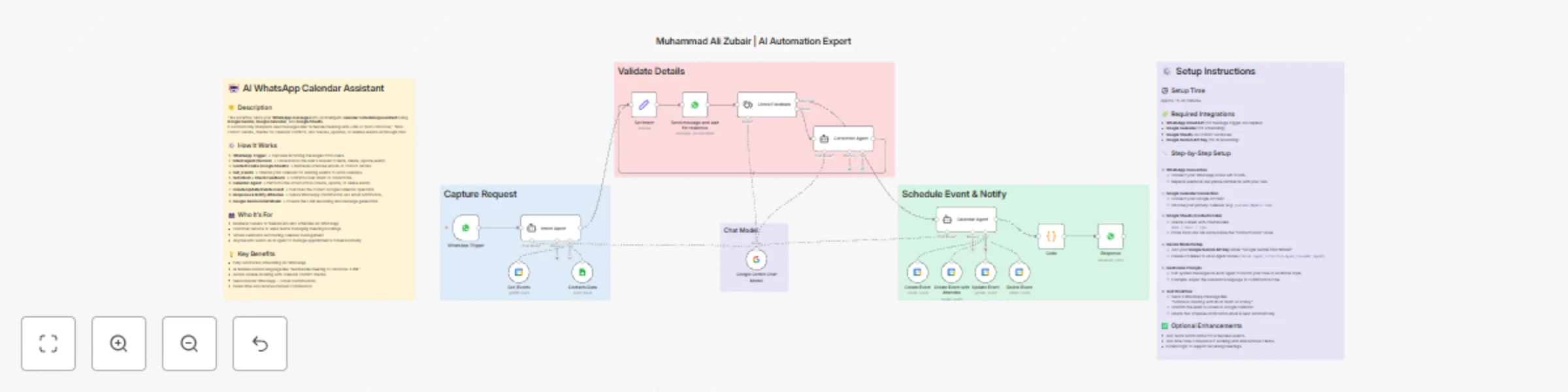
Workflow preview: Schedule meetings via WhatsApp using natural language with Gemini AI & Google Suite
Free advanced

Schedule meetings via WhatsApp using natural language with Gemini AI & Google Suite

### 🚀 How It Works Turn your WhatsApp chats into an **AI-powered meeting scheduler** with **Google Gemini**, **Google Calendar**, and **Google Sheets**. This workflow understands natural language like _“Book a meeting with Ali at 3 PM tomorrow”_, checks your contacts, avoids overlaps, and updates your calendar automatically all from WhatsApp. It’s a complete AI scheduling system built for founders, teams, and service providers who manage clients over chat. --- ### 🔁 Workflow Overview - **WhatsApp Trigger** → Captures incoming messages in real time - **Intent Agent (Gemini)** → Detects scheduling intent (create / edit / cancel) - **Google Sheets** → Finds contact names, emails, and tags - **Get Events** → Checks existing meetings to prevent conflicts - **Correction Agent + Intent Check** → Confirms details with AI - **Calendar Agent (Gemini)** → Executes the calendar action intelligently - **Create / Update / Delete Event** → Syncs instantly to Google Calendar - **Response Node** → Sends WhatsApp and email confirmations --- ### ⚙️ Quick Setup (⏱ ~15 min) 1. **Connect WhatsApp Cloud API** – link your WhatsApp Business account 2. **Authenticate Google Calendar & Sheets** – use Sheets for contacts (`Name | Email | Type`) 3. **Add Google Gemini API Key** – used by `Intent`, `Correction`, and `Calendar` agents 4. **Customize Prompts** – adjust tone and language in the Gemini nodes 5. **Test Your Flow** – e.g., message “Schedule meeting with Ali at 10 AM Friday” to verify calendar and confirmation replies 💡 *All setup details are also documented inside the workflow sticky notes.* --- ### 🧩 Integrations - WhatsApp Cloud API - Google Calendar API - Google Sheets API - Google Gemini (LLM) --- ### 💡 Benefits ✅ Automates scheduling directly from WhatsApp ✅ Understands natural language requests ✅ Prevents double-bookings automatically ✅ Sends instant confirmations ✅ Saves hours of manual coordination --- ### 👥 Ideal For - Entrepreneurs & consultants managing clients on WhatsApp - Sales or support teams booking demos and meetings - Virtual assistants and AI service providers - Anyone who wants a **24/7 AI calendar manager** ---

M
Muhammad Ali
Support Chatbot
3 Nov 2025
661
0
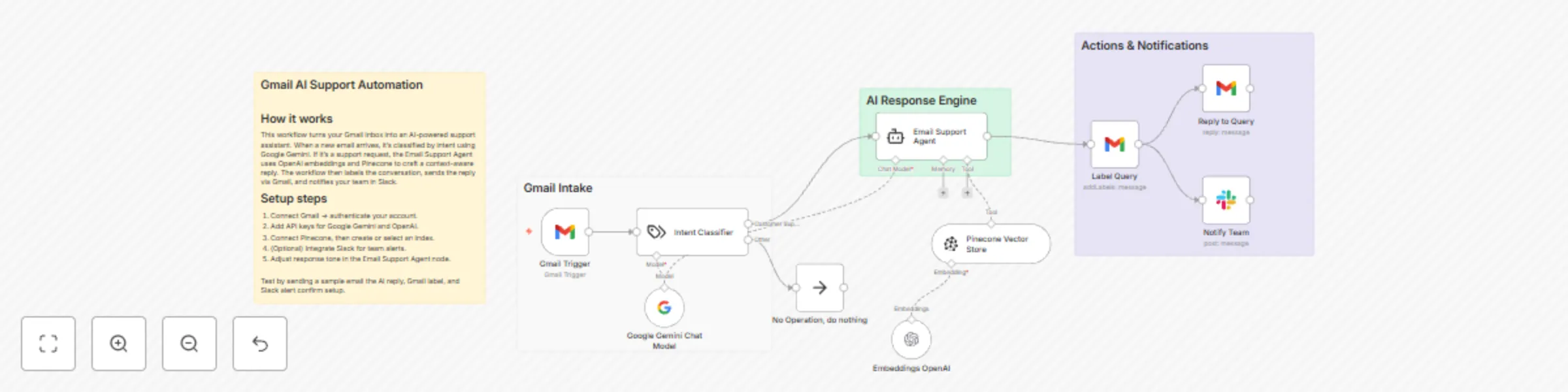
Workflow preview: AI Gmail support automation with Google Gemini, OpenAI & Pinecone
Free intermediate

AI Gmail support automation with Google Gemini, OpenAI & Pinecone

## 💬 AI Gmail Support Automation with Google Gemini, OpenAI & Pinecone ### 🚀 How it Works This workflow turns your Gmail inbox into an **AI-powered customer support assistant** using **Google Gemini**, **OpenAI embeddings**, and **Pinecone vector search**. It automatically classifies incoming emails, retrieves context-based answers from your knowledge base, and replies instantly saving your support team valuable time. ### 🔁 Workflow Overview - **Gmail Trigger** → Detects new incoming customer emails. - **Intent Classifier** → Identifies if the email is a support query or something else. - **Vector Store (Pinecone)** → Retrieves the most relevant information. - **Email Support Agent (Gemini)** → Generates a clear, human-like response. - **Gmail Node** → Sends the AI-generated reply automatically. - **Slack Notification** → Updates your team about the response. - **Label Query** → Adds Gmail labels for tracking and organization. This automation provides **24/7 AI-based email support**, faster customer responses, and zero manual data lookup — ideal for busy teams handling repetitive queries. --- ### 👥 Who It’s For - **SaaS companies** managing frequent customer support requests - **Startups and agencies** looking to automate inbox replies - **Customer success teams** aiming to improve response time - **Freelancers or small businesses** who want smart, auto-handled Gmail support --- ## ⚙️ Set Up Steps **Estimated setup time:** 10–15 minutes 1. **Connect your Gmail and Slack accounts** to n8n. 2. **Add your API keys**: - Google Gemini API key - OpenAI API key 3. **Link your Pinecone Vector Database** (or create a new one). 4. **Customize the system message** in the “Email Support Agent” node to match your tone or brand style. 5. **Send test emails** to ensure the automation responds correctly and labels messages as intended. 6. **Check Slack notifications** to confirm your team gets updates on replies. 💡 *Detailed setup notes are included in the sticky notes inside the workflow.* --- ### 🧩 Integrations Used - Gmail API - Google Gemini LLM - OpenAI Embeddings - Pinecone Vector Database - Slack API --- ### 💡 Key Benefits - Provides **instant AI-based email replies** 24/7 - Reduces manual workload for support teams - Maintains consistent and accurate tone using your knowledge base - Keeps your inbox **organized with automatic labels and team alerts** - Ideal for **scaling customer support without hiring more agents**

M
Muhammad Ali
Ticket Management
3 Nov 2025
138
0

Workflow preview: Automate WhatsApp invoice processing with OCR, GPT-4 Mini & Google Services
Free advanced

Automate WhatsApp invoice processing with OCR, GPT-4 Mini & Google Services

### **Description** #### **How it works** This powerful workflow helps businesses and freelancers automatically manage invoices received on WhatsApp. It detects new messages, downloads attached invoices, extracts key data using **OCR (Optical Character Recognition)**, summarizes the details with **AI**, updates **Google Sheets** for record-keeping, saves files to **Google Drive**, and instantly replies with a clean summary message all without manual effort. Perfect for **small businesses, agencies, accountants, and freelancers** who regularly receive invoices via WhatsApp. Say goodbye to manual data entry and hello to effortless automation. --- #### **Set up steps** Setup takes around **10–15 minutes**: 1. Connect your **WhatsApp Cloud API** to trigger incoming messages. 2. Add your **OCR.Space API key** to extract invoice text. 3. Link your **Google Sheets** and **Google Drive** accounts for data logging and storage. 4. Enter your **OpenAI API key** for AI-based summarization. 5. Import the template, test once, and you’re ready to automate your invoice workflow. --- #### **Why use this workflow** - Save hours of manual data entry - Keep all invoices safely stored and organized in Drive - Get instant summaries directly in WhatsApp - Improve efficiency for client billing, and expense tracking.

M
Muhammad Ali
Invoice Processing
3 Nov 2025
510
0

Workflow preview: Weekly Facebook ads performance reports with AI-powered analysis & Gmail delivery
Free advanced

Weekly Facebook ads performance reports with AI-powered analysis & Gmail delivery

## Who’s it for Perfect for **marketing agencies** that manage multiple Facebook ad accounts and want to automate their weekly reporting. It eliminates manual data collection, analysis, and client updates by delivering a ready-to-share PDF report. ## How it works Every Monday, the workflow: 1. Fetches the previous week’s campaign metrics from the Facebook Graph API. 2. Formats and summarizes each campaign’s performance using OpenAI. 3. Merges all summaries into one comprehensive report with insights and next-week suggestions. 4. Converts the report into a polished PDF using any PDF generation API. 5. Sends the final PDF report automatically to the client via Gmail. ## How to set up 1. Connect your **Facebook**, **OpenAI**, and **Gmail** accounts in n8n. 2. Add credentials for your preferred PDF generator (e.g., PDFCrowd, Placid, etc.). 3. Open the “Set Node” to customize recipient email, date range, or report text. ## Requirements - Facebook Graph API access token - OpenAI API key - Gmail credentials - API key for your PDF generation service ## How to customize You can modify the trigger day, personalize the report design, or include additional analytics such as ROAS, CPC, or conversion data for deeper insights.

M
Muhammad Ali
Document Extraction
3 Nov 2025
548
0