Alexey from Mingles.ai
Workflows by Alexey from Mingles.ai
Telegram chat summarizer with AI - using @telepilotco/n8n-nodes-telepilot
Template Description Automatically generate intelligent summaries of your Telegram community discussions using AI, helping you stay updated on important conversations without reading every message. This powerful n8n automation monitors your Telegram chats and creates periodic AI-powered summaries, highlighting key trends, new ideas, and important updates. Perfect for busy community managers, team leads, and active group participants who want to stay informed without information overload. Key Features 🤖 AI-Powered Analysis Smart Summarization: Uses OpenRouter AI models to analyze conversation patterns Trend Detection: Identifies emerging topics and discussion themes Context Awareness: Maintains conversation history through MongoDB memory Intelligent Filtering: Focuses on meaningful content while skipping noise ⏰ Flexible Scheduling Automated Execution: Runs every 2 hours automatically Manual Triggers: Execute on-demand for instant summaries Time-Based Filtering: Analyzes only recent messages (last 2 hours) Customizable Intervals: Easy to adjust frequency based on chat activity 📱 Advanced Telegram Integration TelePilot Integration: Full Telegram userbot capabilities Chat Access: Can monitor any public or private chat you have access to Message History: Retrieves up to 100 recent messages per execution Real-time Processing: Handles various message types and formats 🧠 Persistent Memory System MongoDB Storage: Maintains conversation context across executions Chat-Specific Memory: Separate memory for each monitored chat Historical Awareness: Avoids repeating previously summarized content Scalable Architecture: Handles multiple chats simultaneously How It Works 1. Chat Monitoring Connects to specified Telegram chat using TelePilot Retrieves recent message history (configurable limit) Filters messages from the last 2 hours 2. Message Processing Extracts text content from various message types Filters out empty messages and system notifications Structures data for AI analysis (sender_id, text, timestamp) 3. AI Analysis Aggregates filtered messages into conversation context Applies AI summarization with custom system prompts Identifies trends, new ideas, and important updates Maintains awareness of previous summaries to avoid repetition 4. Summary Delivery Posts AI-generated summary back to the chat Includes conversation trends and key highlights Formatted for easy reading and quick understanding Setup Requirements TelePilot Plugin Installation Before using this template, install the TelePilot community node: Go to Settings → Community modules in your n8n instance Select "Install Community node" Specify the name: @telepilotco/n8n-nodes-telepilot Check the risk acknowledgment checkbox and click "Install" Required Integrations TelePilot Account: For Telegram userbot functionality (Full Documentation) OpenRouter API: For AI summarization capabilities MongoDB Database: For persistent conversation memory Target Telegram Chat: Public or private chat access TelePilot Authentication After installation, you'll need to authenticate your Telegram account: Click the "Chat" button at the bottom of the n8n interface Type /start in the chat window and follow instructions Keep your smartphone or desktop Telegram app ready to receive the authentication code 📖 Complete TelePilot Setup Guide Configuration Options Chat Selection: Easily change target chat by username Schedule Frequency: Adjust from 2-hour default to your needs Message Limit: Control how many messages to analyze Summary Style: Customize AI prompts for different summary formats Perfect For Community Managers: Keep track of multiple active groups Team Leaders: Stay updated on team discussions across time zones Active Group Members: Catch up on missed conversations quickly Content Creators: Monitor audience discussions and feedback Research Teams: Track ongoing project conversations Global Teams: Bridge communication gaps across different schedules Key Benefits ✅ Never Miss Important Updates: Stay informed without constant monitoring ✅ Reduce Information Overload: Get concise summaries instead of hundreds of messages ✅ Maintain Context: AI remembers previous summaries to avoid repetition ✅ Flexible Scheduling: Automated or manual execution options ✅ Multi-Chat Support: Monitor multiple communities simultaneously ✅ Trend Analysis: Identify emerging topics and discussion patterns ✅ Time-Efficient: Spend minutes instead of hours catching up ✅ Scalable Solution: Works for groups of any size Use Cases Daily Team Standup Summaries: Automated updates for distributed teams Community Highlight Reels: Weekly summaries for large communities Project Status Updates: Track ongoing discussions and decisions Customer Feedback Analysis: Monitor support and feedback channels Event Planning Updates: Stay current on planning discussions Learning Community Insights: Track educational discussions and resources What's Included 🔧 Complete Workflow: Ready to deploy with minimal configuration 📋 Setup Instructions: Step-by-step TelePilot integration guide 🎯 Smart Filtering: Pre-configured message processing logic 🤖 AI Optimization: Fine-tuned prompts for quality summaries 💾 Memory Management: MongoDB integration for context persistence ⚙️ Error Handling: Robust workflow with fallback mechanisms Transform your chat monitoring from overwhelming to insightful with this intelligent automation solution! Documentation: TelePilot Plugin Documentation Tags: #Telegram #AI #ChatSummary #CommunityManagement #TelePilot #OpenRouter #MongoDB #Automation #TeamCommunication #ContentCuration
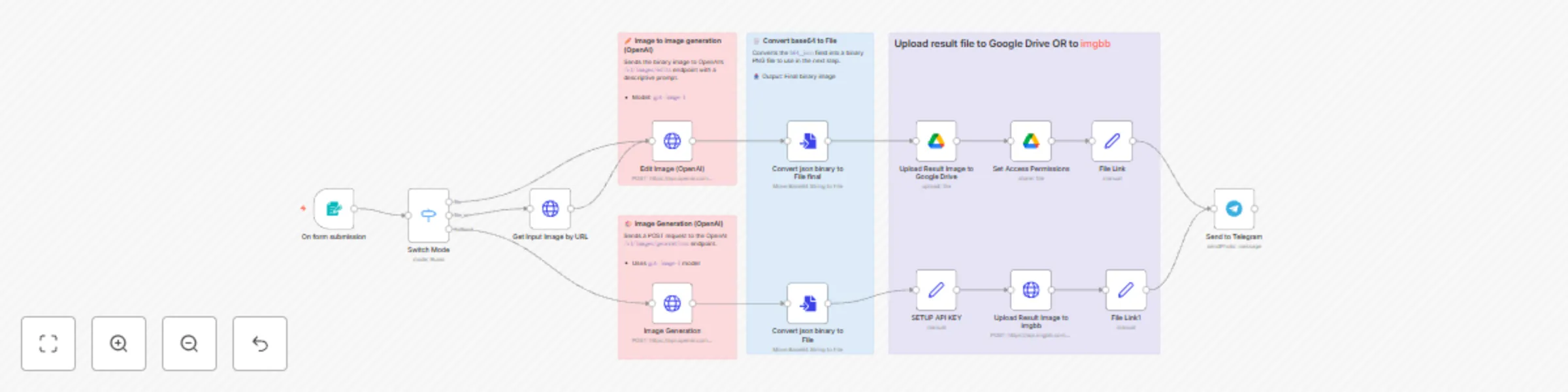
Generate & edit images with OpenAI GPT-Image-1 and share via Telegram
# AI Image Generator & Editor with GPT-4 Vision - Complete Workflow ## Template Description **Transform text prompts into stunning images or edit existing visuals using OpenAI's latest GPT-4 Vision model through an intuitive web form interface.** This comprehensive n8n automation provides three powerful image generation modes: ### 🎨 **Text-to-Image Generation** Simply enter a descriptive prompt and generate high-quality images from scratch using OpenAI's `gpt-image-1` model. Perfect for creating original artwork, concepts, or visual content. ### 🖼️ **Image-to-Image Editing** Upload an existing image file and transform it based on your text prompt. The AI analyzes your input image and applies modifications while maintaining the original structure and context. ### 🔗 **URL-Based Image Editing** Provide a direct URL to any online image and edit it with AI. Great for quick modifications of web images or collaborative workflows. ## Key Features ### **Smart Input Processing** - **Flexible Form Interface**: User-friendly web form with authentication - **Multiple Input Methods**: File upload, URL input, or text-only generation - **Quality Control**: Selectable quality levels (low, medium, high) - **Format Support**: Accepts PNG, JPG, and JPEG formats ### **Advanced AI Integration** - **Latest GPT-4 Vision Model**: Uses `gpt-image-1` for superior results - **Intelligent Switching**: Automatically detects input type and routes accordingly - **Context-Aware Editing**: Maintains image coherence during modifications - **Customizable Parameters**: Control size (1024x1024), quality, and generation settings ### **Dual Storage Options** - **Google Drive Integration**: Automatic upload with public sharing permissions - **ImgBB Hosting**: Alternative cloud storage for instant public URLs - **File Management**: Organized storage with timestamp-based naming ### **Instant Telegram Delivery** - **Real-time Notifications**: Results sent directly to your Telegram chat - **Rich Media Messages**: Includes generated image with prompt details - **Quick Access Links**: Direct links to view and download results - **Markdown Formatting**: Clean, professional message presentation ## Technical Workflow 1. **Form Submission** → User submits prompt and optional image 2. **Smart Routing** → System detects input type (text/file/URL) 3. **AI Processing** → OpenAI generates or edits image based on mode 4. **Binary Conversion** → Converts base64 response to downloadable file 5. **Cloud Upload** → Stores in Google Drive or ImgBB with public access 6. **Telegram Delivery** → Sends result with viewing links and metadata ## Perfect For - **Content Creators**: Generate unique visuals for social media and marketing - **Designers**: Quick concept development and image variations - **Developers**: Automated image processing for applications - **Teams**: Collaborative image editing and sharing workflows - **Personal Use**: Transform ideas into visual content effortlessly ## Setup Requirements - **OpenAI API Key**: Access to GPT-4 Vision model - **Google Drive API** (optional): For Google Drive storage - **ImgBB API Key** (optional): For alternative image hosting - **Telegram Bot**: For result delivery - **Basic Auth Credentials**: For form security ## What You Get ✅ Complete image generation and editing pipeline ✅ Secure web form with authentication ✅ Dual cloud storage options ✅ Instant Telegram notifications ✅ Professional result formatting ✅ Flexible input methods ✅ Quality control settings ✅ Automated file management **Start creating AI-powered images in minutes with this production-ready template!** --- **Tags**: #AI #ImageGeneration #OpenAI #GPT4 #ImageEditing #Telegram #GoogleDrive #Automation #ComputerVision #ContentCreation
AI-powered Telegram task assistant with Notion integration
This workflow creates a powerful AI assistant in Telegram that helps you manage your tasks in Notion. The assistant leverages OpenAI's language models to understand natural language commands, process voice messages, and maintain context through conversations. Key features: - Processes both text and voice messages in Telegram - Transcribes voice messages automatically - Maintains conversation context with memory - Manages Notion tasks through a custom tool: • List all tasks • Add new tasks with priority (today/later) • Complete or uncomplete tasks • Change task timing The workflow consists of two main parts: 1. AI Agent section: Handles Telegram connectivity, message processing, voice transcription, and conversation management 2. Notion Tool section: Implements the custom tool that connects to your Notion database, allowing the AI to interact with your tasks Setup requires: - A Telegram bot token - OpenAI API credentials - Notion integration token and database ID [Example Notion Database](https://minglesai.notion.site/1feb53dccd6a81a1a12aedea55bff6a6?v=1feb53dccd6a81f5880c000c0387b716&pvs=4) Perfect for personal productivity, team task management, or as a foundation for building more complex AI assistants with additional tools.