A

Abolfazl Akbarzadeh

1
Workflow

Workflows by Abolfazl Akbarzadeh

Workflow preview: Send Jira task notifications to Telegram user via Bot
Free intermediate

Send Jira task notifications to Telegram user via Bot

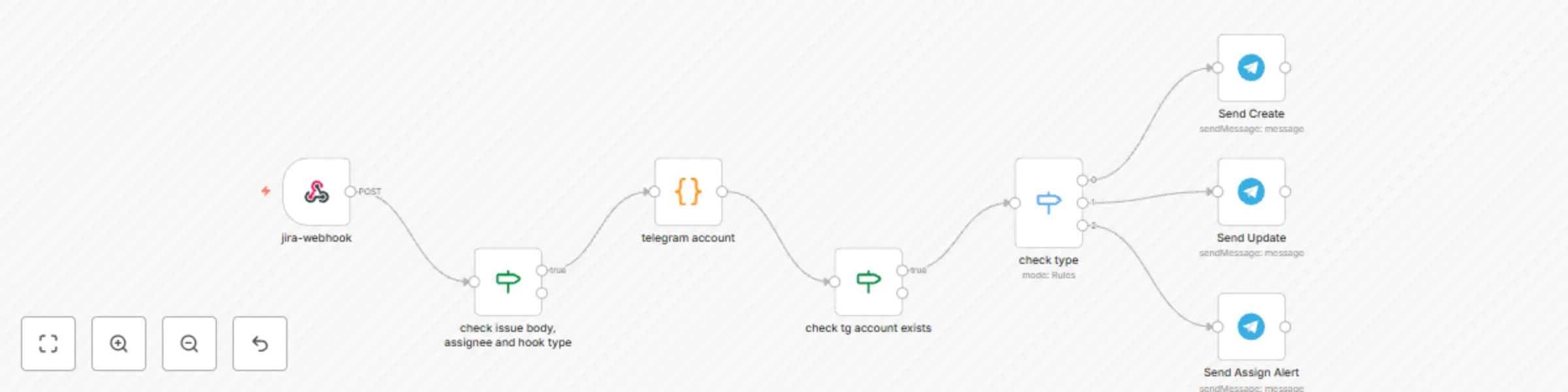
**What we wanna do?** Let's look at the concern. In my experience, some developers don't check their Jira board to find out whether there are new updates on the issues or not or if some Issues need to be addressed as soon as possible. So, the developer or anyone else in other fields needs to be informed about the task as soon as possible, too. One way to send this immediate notification is through the Telegram Bot. **Setup Guide** so, first of all, you need to register a Telegram Bot in your account and obtain its token, so that we'll be able to send Telegram messages by using this token through our bot; after getting your telegram bot token - go to the workflow and click on *one of the telegram nodes* - select the telegram credential or create one through the **Credential to connect with** field - and put the token in the token in the **Access Token** field. Ok, you're done with the Telegram Side setup. then you need the Jira accounts (team users) **accountId** and also their telegram **chatId** for the **telegram account** node so that it can find the corresponding telegram user from the assignee of the issue, put this data as following guide comments in the **telegram account** node. Now we go for the Jira side setup, you need to setup some **automation rules** as your needs. - go to the Jira settings and **Global automation** section, click on the *Create Rule* button - select the **Issue Created** trigger type in the *When* step - add a **Send webhook request** action, after selecting it you'll see its settings - go back to workflow and from the **jira-webhook** node copy the **Production URL** - paste it in the **Web request URL** field in the Jira action setting - then set the **HTTP method** field on **POST** - set **Web request body** on **Issue Data (Automation format)** - in the header section, add a new header with the name **type** and value **created** for the creation event. OK, the Jira side also is done! Now It's time to test! If you've put your Jira **accountId** and telegram **chatId** in the **telegram account** node and of course started the telegram bot, after creating an Issue that is assigned to you, the creation notif will send to you in telegram!

A
Abolfazl Akbarzadeh
Project Management
9 Jan 2025
2311
0