A

Abbas Ali

3
Workflows

Workflows by Abbas Ali
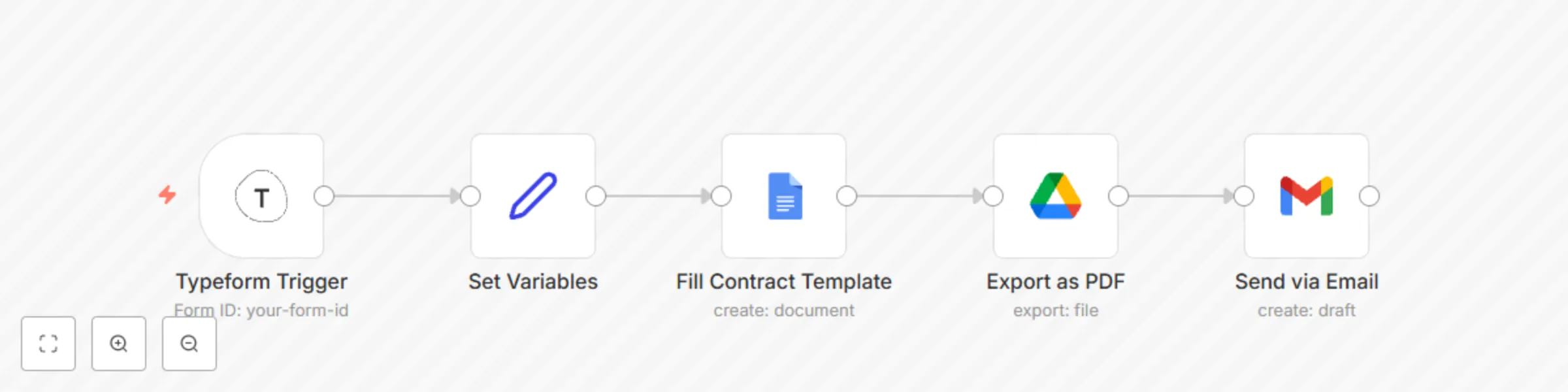
Workflow preview: Generate and send contract documents with Typeform, Google Docs and Gmail
Free intermediate

Generate and send contract documents with Typeform, Google Docs and Gmail

This workflow is designed for teams or freelancers who want to auto-generate and send contracts based on information gathered from a Typeform (e.g., client name, project scope, deadlines). Perfect for HR onboarding, client agreements, or legal operations. ## Prerequisites - To use this workflow, you’ll need: - A Typeform account and a published form - Access to Google Docs (or use a local document template) - Gmail or SMTP email integration in n8n - n8n Desktop or a hosted n8n instance ## How It Works - **Trigger:** Listens for new Typeform submissions. - **Extract Data:** Parses the answers from the form. - **Generate Contract:** Fills a contract template using form inputs. - **Create PDF:** Exports the filled contract as a PDF. - **Send Email:** Sends the PDF to the client’s email address provided in the form. ## Nodes Used - **Typeform Trigger** – Triggers on form submission. - **Set Node** – Maps form answers into variables. - **Google Docs (or HTTP Request)** – Uses a template to generate the contract. - **Google Drive / PDF Converter** – Converts to PDF (if needed). - **Email (Gmail/SMTP)** – Sends the completed contract to the recipient. ## Tips - Replace the Google Docs template ID with your own. - Ensure the variable placeholders (like {{client_name}}) match your document. - Use the Cron node instead of Typeform Trigger if you want to poll periodically.

A
Abbas Ali
Document Extraction
2 Aug 2025
779
0
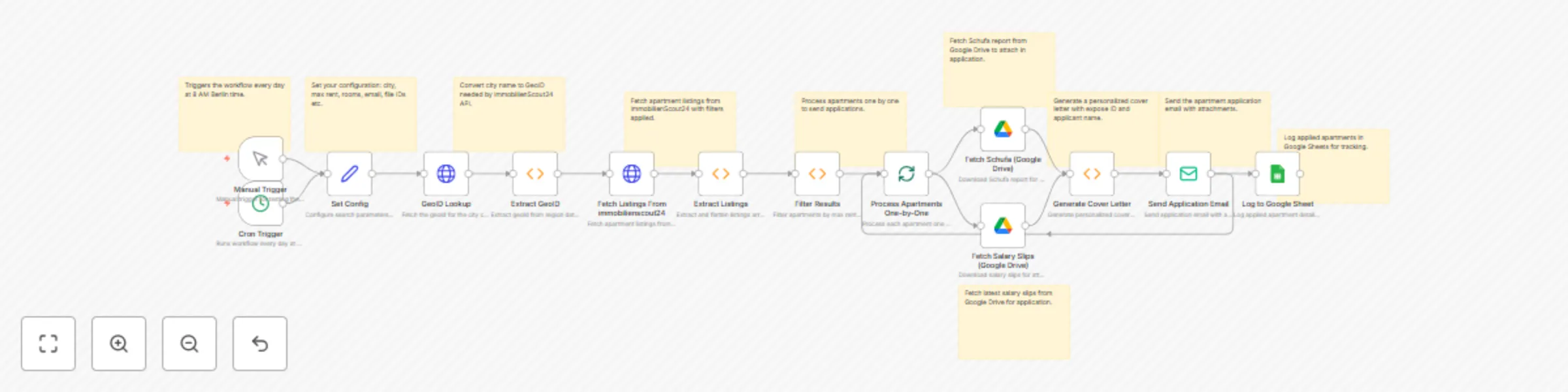
Workflow preview: Auto Germany apartment search & apply with Immobilienscout24 & Google Services
Free advanced

Auto Germany apartment search & apply with Immobilienscout24 & Google Services

This n8n workflow automatically finds apartments for rent in Germany, filters them by your city, rent budget, and number of rooms, and applies to them via email. Each application includes: - A personalized German cover letter - Schufa report (fetched dynamically from Google Drive) - Recent salary slips (also fetched from Google Drive) The workflow runs daily at a scheduled time, emails landlords or agencies automatically, and logs every application into a Google Sheet for tracking. ## How It Works 1. **Scheduled Trigger** – Runs every day at 9 AM (adjustable). 2. **Fetch Listings** – Uses immobilienscout24 API (or similar) to pull rental listings for your selected city. 3. **Filter Listings** – Keeps only listings matching your CITY, MAX_RENT, and ROOMS settings. 4. **Fetch Documents** – Retrieves your Schufa report and salary slips from Google Drive (no need for local hosting). 5. **Generate Cover Letter** – Creates a personalized German-language letter per apartment. 6. **Send Email Application** – Sends the email to the landlord or agent with cover letter + documents attached. 7. **Log Applications** – Saves each application (title, address, rent, date) in a Google Sheet. ## How to Use 1. Import the workflow JSON into n8n. 2. Set environment variables in n8n (for security): - **immobilienscout24_TOKEN:** Your immobilienscout24 API token - **immobilienscout24_LISTING_ACTOR:** Actor ID for your preferred rental listing scraper (or custom) - **MY_EMAIL:** Your sender email address (SMTP configured in n8n) - **SCHUFA_FILE_ID:** Google Drive File ID for your Schufa PDF - **SALARY_FILE_ID:** Google Drive File ID for your Salary Slips PDF - **APPLICATION_SHEET_ID:** Google Sheet ID to log applications 3. Authenticate Google Drive and Google Sheets (OAuth2 in n8n). 4. Customize search filters in the Set Config node: - **CITY** (e.g., Berlin) - **MAX_RENT** (e.g., 1200) - **ROOMS** (e.g., 2) 5. Activate the workflow – It will run daily at the configured time and send applications automatically. 6. Check your Google Sheet – Every application will be logged for tracking. ## Requirements - An immobilienscout24 account (or another apartment listing API, can be substituted). - A Google account (for Drive and Sheets integration). - A Schufa report (PDF) uploaded to Google Drive. - Recent salary slips (PDF) uploaded to Google Drive. - An SMTP-configured email account for sending applications. - n8n instance (self-hosted or cloud) with: - Google Drive and Google Sheets credentials configured - Environment variables set for tokens and file IDs - A working email SMTP setup

A
Abbas Ali
Personal Productivity
19 Jul 2025
1029
0
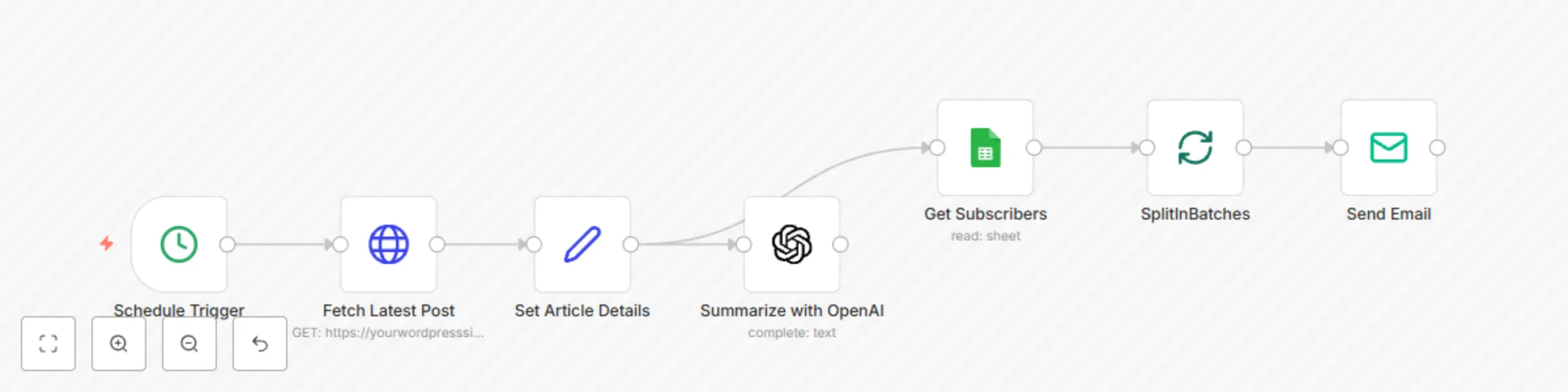
Workflow preview: WordPress article summarization with GPT-4 and email broadcasting via Google Sheets
Free intermediate

WordPress article summarization with GPT-4 and email broadcasting via Google Sheets

This automation fetches the latest article from a WordPress blog, summarizes it using OpenAI, and sends the summary to a list of subscribers via email. Ideal for content creators and bloggers who want to distribute digestible content without manual effort. ## Use Case Perfect for: • Newsletter creators • Content marketers • Bloggers • Knowledge managers Nodes Used • Schedule Trigger • HTTP Request • Set • OpenAI • Google Sheets • Email (Gmail/SMTP) • IF • SplitInBatches ## Workflow Steps 1. Trigger: Starts on a schedule (e.g., daily at 9:00 AM). 2. Fetch Blog Post: Retrieves the most recent post from a WordPress blog via HTTP Request. 3. Extract Fields: A Set node extracts the title, link, and content. 4. Summarize Article: OpenAI processes the article and returns a 3-point summary. 5. Fetch Subscribers: Google Sheets reads email addresses from a subscriber list. 6. Loop Emails: SplitInBatches and Send Email nodes loop through subscribers. 7. Conditional Logic: IF node skips articles shorter than 300 words. ## Credentials Required • OpenAI API Key (for content summarization) • Google Sheets OAuth2 (to read subscriber emails) • Gmail or SMTP (for sending emails) ## Test Instructions 1. Replace blog URL in HTTP Request node. 2. Connect OpenAI API key. 3. Link your Google Sheet with a column named Email. 4. Set up Gmail or SMTP credentials. 5. Run manually for testing, then activate schedule.

A
Abbas Ali
Social Media
16 Jul 2025
251
0