Ninja - Abbas
Workflows by Ninja - Abbas
Create professional email drafts with GPT-4, Telegram & contact database
**Transform** your email workflow with this intelligent automation that drafts professional emails through Telegram commands using AI and contact retrieval. Key Features 📱 Telegram Integration: Send email requests directly from Telegram 🤖 AI-Powered Email Generation: Uses OpenAI GPT-4 to create formal, professional emails 📧 Smart Contact Retrieval: Leverages Pinecone vector database with RAG to automatically find recipient email addresses ✉️ Gmail Draft Creation: Automatically creates email drafts in your Gmail account 📋 Google Docs Integration: Sync contact data from Google Docs to vector database 🎯 Structured Email Formatting: Ensures consistent professional email format with proper recipients and formal tone ## How It Works Send Message: Send a message via Telegram with your email request AI Processing: AI agent processes your request and queries the contact database to find recipient emails Email Generation: OpenAI generates a professionally formatted email based on your input Draft Creation: Gmail draft is automatically created with the formatted content Confirmation: Receive confirmation via Telegram with a completion sticker ### Perfect For Business professionals managing multiple contacts Academic professionals (professors, researchers) who frequently send formal emails Anyone wanting to streamline their email creation process with AI assistance #### Required Credentials Telegram Bot API OpenAI API google OAuth2 for(gmail&docs) Pinecone Vector Database ##### Setup Instructions **Load Contact Data:** Add your contact information to the Google Docs document **Configure Pinecone:** Set up your Pinecone index with namespace "contacts" **Connect Services:** Add all required API credentials to their respective nodes **Customize AI:** Modify the AI system message and sender name in the AI Agent node **Test Workflow:** Run the manual trigger to populate your vector database first ** #### Ex. of the google docs data 
Automated quiz delivery from Google Sheets to Telegram with status tracking
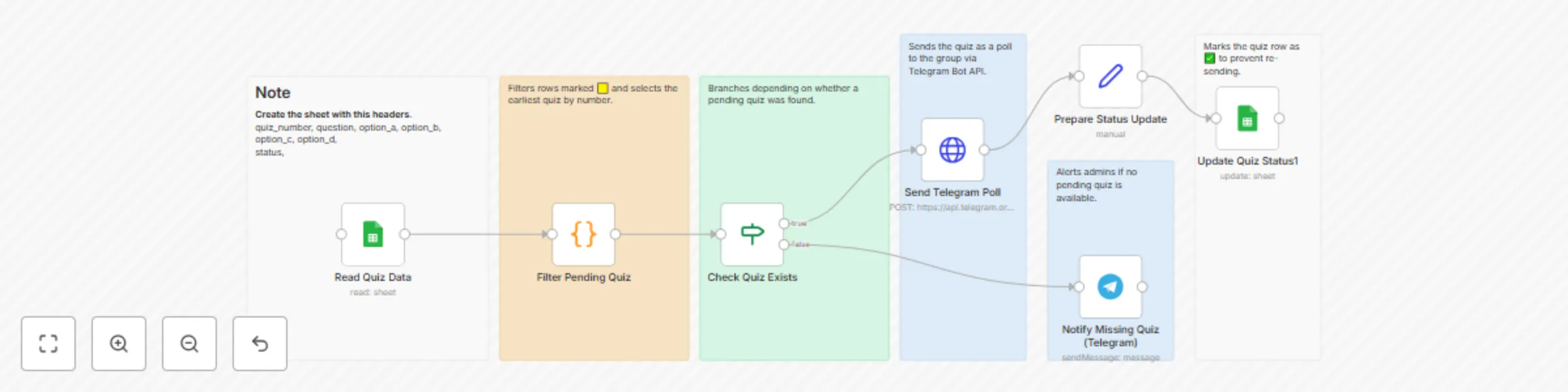
## Overview This workflow automates quiz delivery from a Google Sheet directly into a Telegram group. It ensures that quizzes are posted one by one as polls, and once a quiz is sent, its status in the sheet is automatically updated to prevent duplication. If no pending quiz is available, the workflow notifies a separate Telegram channel to refill the sheet. ## Target Audience This template is designed for teachers, community managers, and Telegram group admins who want an easy way to run quizzes, trivia games, or knowledge checks without manual posting. ## Problem It Solves Manually sending quizzes is repetitive and prone to mistakes (like re-posting the same question). This template ensures quizzes are sent in order, tracked, and managed automatically with minimal human effort. ## Requirements - An active Google account with Google Sheets enabled - A Telegram bot token (via [BotFather](https://core.telegram.org/bots#botfather)) - Chat IDs for both the quiz group and the notification group ## Google Sheet Structure Create a sheet with the following columns: quiz_number | question | option_a | option_b | option_c | option_d | status - **status**: Use 🟨 for pending quizzes, ✅ once completed ## Setup Instructions 1. Copy the workflow into your n8n instance. 2. Add your Google Sheets credentials. 3. Replace the `YOUR_SHEET_ID` placeholder with your sheet ID. 4. Set environment variables: - `TELEGRAM_BOT_TOKEN` - `TELEGRAM_CHAT_ID` (for the group) - `TELEGRAM_NOTIFY_CHAT_ID` (for refill notifications) 5. Run the workflow. ## Customization Options - Adjust the sheet name if not using “Sheet1” - Change emoji markers (🟨 / ✅) to your preferred system - Modify the Telegram notification message